
Last quarter, a SaaS startup crossed 100K daily users. Everything looked fine in staging.
But in production:
- Login requests randomly failed
- API routes started timing out
- SSL certificates behaved inconsistently
- Traffic spikes caused uneven server load
They already had a load balancer. The problem wasn’t having one. The problem was choosing the wrong type.
They used a Layer 4 load balancer when their architecture required a Layer 7 load balancer. That single decision started breaking the system at scale.
Let’s understand why.
What Is a Load Balancer?
A load balancer distributes incoming traffic across multiple backend servers.
Its goals are simple:
- High availability
- Even traffic distribution
- Failover handling
- Better performance
But not all load balancers work the same way.They operate at different layers of the OSI model.
The two most common types are:
- Layer 4 (L4) Load Balancer
- Layer 7 (L7) Load Balancer
Layer 4 Load Balancer (Transport Layer)
A Layer 4 load balancer works at the TCP/UDP level.
It only sees:
- IP address
- Port number
It does not inspect HTTP paths or headers.
Simple Analogy
Imagine a traffic police officer at an intersection.
They see cars.
They do not know:
- Who is inside
- Where they are going
- Why they are traveling
They just direct traffic evenly.
That’s Layer 4.
Layer 4 Request Flow (Visual)
Client
   │
   ▼
Load Balancer (L4)
   │  (Sees IP + Port only)
   ▼
Backend A / Backend B / Backend C
Whether the request is:
- /api/users
- /login
- /images/logo.png
Layer 4 treats them all the same.
So it simply chooses a backend server using:
- Round Robin
- Least connections
- Hashing
Example:
/api/users  → Backend A
/login      → Backend B
/images     → Backend C
But this decision is random (based on algorithm), NOT based on URL.
When Should You Use Layer 4 Load Balancer?
Layer 4 is ideal for:
- Database traffic
- Gaming servers
- High-performance TCP workloads
- Systems that don’t require HTTP inspection
It is:
- Lightweight
- Fast
- Low latency
But it lacks application awareness.
Practical Use Case: Database Load Balancing (MySQL / PostgreSQL)
Imagine you run a high-traffic SaaS application.
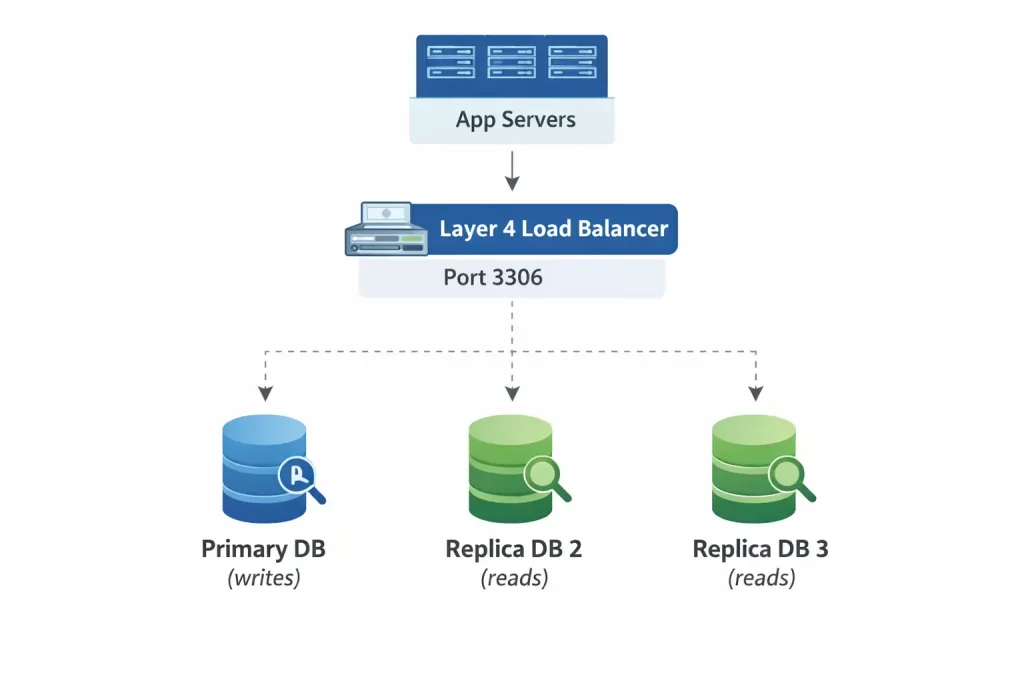
You have:
- 1 Primary database (writes)
- 3 Read replicas (reads)
Your application needs to send read queries to replicas for scaling.
Architecture
App Servers
     │
     ▼
Layer 4 Load Balancer (Port 3306)
     │
     ▼
Replica DB 1
Replica DB 2
Replica DB 3
Why Layer 4 Works Perfectly Here
Database traffic:
- Uses TCP
- Does NOT use HTTP
- Has no URL paths like
/api - Runs on port 3306 (MySQL) or 5432 (Postgres)
Layer 4 only needs to see:
- IP
- Port
That’s enough.
It distributes connections across replicas using:
- Round robin
- Least connections
No need for Layer 7 because:
- There is no HTTP
- No path-based routing
- No headers
- No cookies
Layer 7 Load Balancer (Application Layer)
A Layer 7 load balancer works at the HTTP/HTTPS level.
It understands:
- URL paths
- Headers
- Cookies
- Hostnames
- HTTP methods
It doesn’t just forward traffic.It makes routing decisions based on application logic.
Layer 7 Request Flow (Visual)
Client
   │
   ▼
Load Balancer (L7)
   │
   ├── If path = /api/*  → API Servers
   ├── If path = /login  → Auth Service
   └── If path = /images → Media Service
Now traffic is routed intelligently.
Real-World Example
If your architecture looks like this:
myapp.com/api
myapp.com/admin
myapp.com/billing
Layer 4 sees only port 443.
Layer 7 sees the actual URL path and can route accordingly.
This is critical in:
- Microservices architecture
- Container-based deployments
- Three-tier applications
- Cloud-native systems
Practical Use Case: Microservices-Based SaaS Application
Imagine you run an e-commerce platform.

Your system has:
- API Service
- Authentication Service
- Product Service
- Image Service
- Admin Dashboard
All under one domain:
myshop.com
Architecture
Users
   │
   ▼
Layer 7 Load Balancer (HTTPS 443)
   │
   ├── /api/*     → API Servers
   ├── /login     → Auth Service
   ├── /products  → Product Service
   ├── /images/*  → Media Servers
   └── /admin     → Admin Backend
What Layer 7 Is Doing Here
Layer 7:
- Reads the URL path
- Understands HTTP headers
- Terminates SSL
- Applies routing rules
So when a user visits:
myshop.com/products/123
The load balancer inspects /products/123
Then forwards it only to Product Service servers.
If someone visits:
myshop.com/login
It routes only to Auth Service.
Why Layer 4 Cannot Do This
Layer 4 sees only:
myshop.com:443
It cannot differentiate:
/api/login/admin
Layer 4 vs Layer 7 Load Balancer Comparison
| Feature | Layer 4 Load Balancer | Layer 7 Load Balancer |
|---|---|---|
| OSI Layer | Transport | Application |
| Protocol | TCP / UDP | HTTP / HTTPS |
| Path-based routing | No | Yes |
| SSL termination | Limited | Yes |
| Header inspection | No | Yes |
| Performance | Very High | High |
| Best For | Raw TCP traffic | Modern SaaS & microservices |
Why Modern Cloud Systems Prefer Layer 7
Today’s systems require:
- Path-based routing
- SSL termination at the edge
- Web Application Firewall integration
- Cookie-based session stickiness
- Traffic shaping and blue-green deployments
These features require Layer 7 intelligence.
That’s why most modern cloud providers recommend Layer 7 load balancers for web applications.
More Practical Implementation Details
Use Layer 4 Load Balancer When:
- Balancing database clusters
- Handling pure TCP workloads
- Running gaming or streaming services
- You don’t need content-based routing
Examples:
- AWS Network Load Balancer
- Azure Load Balancer
Use Layer 7 Load Balancer When:
- Running microservices
- Deploying containers
- Using path-based routing
- Terminating SSL at the edge
- Integrating WAF
- Supporting CI/CD traffic control
Examples:
- AWS Application Load Balancer
- Azure Application Gateway
- NGINX (HTTP mode)
Final Takeaway
A load balancer is not just a traffic distributor.It is an architectural decision.Layer 4 is fast but blind.Layer 7 is intelligent and cloud-native.If you’re building scalable systems in 2026, choosing the right load balancer is not optional.Because architecture decisions don’t fail during testing.
They fail when traffic scales.
Interview Questions
What is a load balancer and how does it work?
What is the difference between Layer 4 and Layer 7 load balancers?
When should I use a Layer 4 load balancer instead of Layer 7?
How does a Layer 7 load balancer route traffic based on URL paths?
Why is a load balancer important in microservices architecture?


