
Target Audience
The target audience for this article falls into the following roles:
- Software engineers preparing for system design interviews
- Tech workers
- DevOps and Cloud aspirants
What You Will Learn
This article explains Load Balancers in a simple, story-based way. You will understand:
- What a Load Balancer actually is
- How it worked before cloud
- How AWS and Azure Load Balancers work today
By the end, you will clearly know what happens inside that small “Load Balancer” box in every system diagram.
Chapter 1 — The Early Web (One Server Was Enough)
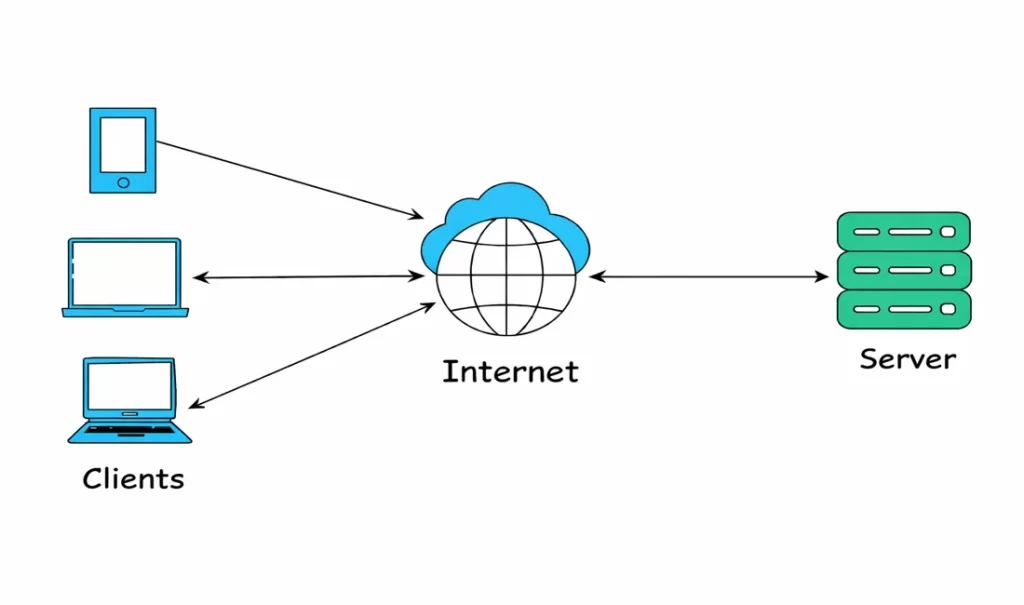
In the beginning, most applications lived on a single server. One machine , One IP address ,All users connected directly to it.
For small traffic, this worked perfectly. But as users increased, problems started appearing:
- CPU became overloaded
- Requests slowed down
- If the server stopped → whole website went down
This design had a simple weakness: One server = one failure point
So engineers added more servers. But then a new question appeared. If we have 5 servers… how does a user know which server to connect to?
Chapter 2 — The First Solution (Hardware Load Balancers)
To solve this, companies introduced a new device in front of servers. A special network box called a Load Balancer.
This box:
- accepted all incoming traffic
- checked which servers were healthy
- distributed requests across them
Internally, it was just:
- Linux OS
- Reverse proxy software (such as HAProxy or Nginx)
- routing logic
- health checks
So technically, a load balancer was simply: a smart reverse proxy that sits between users and servers
Flow became:
User → Load Balancer → Server A / B / C , If Server A failed, traffic automatically moved to B or C.
Reverse proxy
A reverse proxy is just a server that stands in front of your real servers and handles all requests first. Users never talk directly to your backend machines.
They only talk to the reverse proxy.
Users never see or access the real servers. They only see the proxy. The proxy receives the request, decides which backend server should handle it, forwards the request, and then sends the response back to the user.
Because of this middle layer, the system becomes safer and smarter. The proxy can distribute traffic across multiple servers, block unhealthy servers, handle HTTPS, and protect your internal machines from direct exposure.
In simple words: A reverse proxy is like a gatekeeper that controls all incoming traffic before it reaches your servers.
Traffic Flow before reverse proxy

Traffic Flow after reverse proxy

For the first time, systems became reliable. For the first time, systems became reliable.
Chapter 3 — The Hidden Challenges Behind Load Balancers
At first, adding a load balancer looked like a perfect solution.
- Traffic was distributed.
- Servers stopped crashing.
- System became more reliable.
But as traffic kept growing, new problems started appearing. Not technical theory problems — real operational headaches.
Setting Rules Was Not Simple
As applications grew, one server was not enough. We now had:
- API servers
- Web servers
- Image servers
- Auth services
Requests could not go to random machines anymore. They had to be routed carefully.
For example:
/api/*→ API servers/images/*→ image servers/login→ auth servers
So we had to configure routing rules inside the load balancer. But managing dozens of rules manually became messy. One wrong rule could send traffic to the wrong service and break the app.
Listeners Added More Complexity
A listener in a load balancer checks incoming requests on a specific port and protocol (like HTTP on port 80). It then forwards those requests to the correct backend servers based on defined rules.
Different traffic types required different ports:
- HTTP → 80
- HTTPS → 443
- TCP → custom ports
Each port needed a listener. Each listener needed:
- certificates
- routing rules
- security settings
As services increased, listeners increased. Configuration became harder to manage.
Scaling the Load Balancer Itself
Earlier, we only worried about scaling servers. Now we realized something new: the load balancer can also become a bottleneck.
If too many users hit one load balancer:
- connections pile up
- latency increases
- sometimes the LB itself crashes
So now we had to scale:
- backend servers
- and the load balancer
Managing hardware capacity was expensive and complicated. We had to predict traffic in advance. If we guessed wrong, downtime happened.
Rate Limiting and Protection
Another issue appeared: bad traffic. Some users or bots could send:
- too many requests
- DDoS traffic
- brute force login attempts
Without protection, backend servers could get overwhelmed. So we had to add:
- rate limits
- throttling
- connection limits
All this logic had to be configured manually in proxy software. More configs. More complexity. More chances of mistakes.
The Reality
At this point, the load balancer was no longer “just a simple proxy”. t became:
- traffic manager
- security layer
- routing engine
- scaling component
And managing all this on physical machines or self-managed software was painful. Teams were spending more time managing infrastructure than building features. Something had to change.
Chapter 4 — Moving to the Cloud (Load Balancer Becomes a Service)
By this point, the load balancer was no longer a small network box. It had become the most critical part of the system.
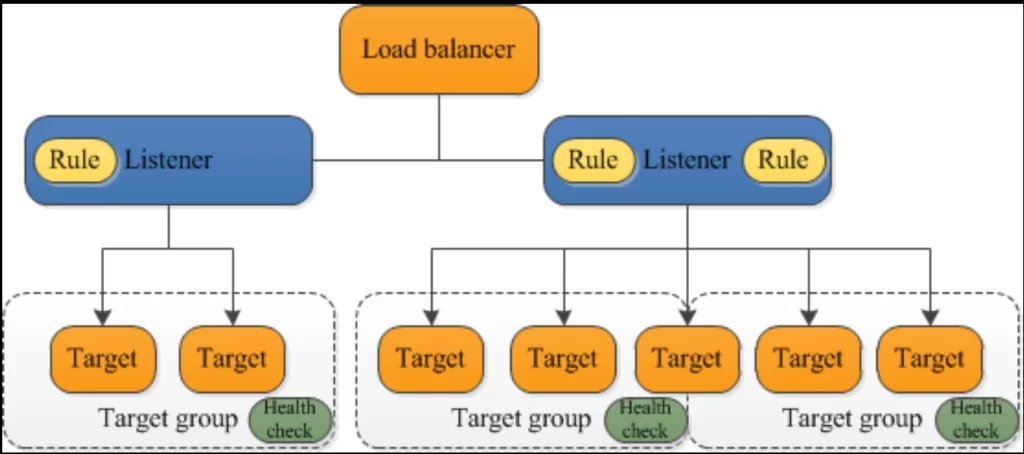
It was handling:
- traffic routing
- listeners and ports
- SSL certificates
- health checks
- rate limiting
- scaling
- security
And we were managing everything manually. Every time traffic increased, we had to:
- upgrade hardware
- add more capacity
- tune proxy configs
- restart services
- hope nothing breaks
Infrastructure work slowly became bigger than application work.Engineers were spending more time managing load balancers than building features.This didn’t scale.
The Big Shift
Cloud platforms changed this completely.Instead of installing hardware. Instead of running proxy software ourselves.Instead of worrying about scaling capacity.
Load balancing became a managed service.
In Amazon Web Services, this is called Elastic Load Balancing. In Microsoft Azure, this is called Azure Load Balancer.
Now we don’t manage machines. We simply configure behavior.
What changed for engineers?
Earlier:
Install Linux , install HAProxy/Nginx , configure manually , manage scaling , handle failures
Now:
create Load Balancer , add listeners , add rules , attach backend servers
That’s it.
Cloud handles:
- auto scaling
- high availability
- failover
- distributed infrastructure
- capacity planning
- hardware maintenance
The same reverse proxy idea still exists. But now it runs across hundreds of servers behind the scenes.
Why this matters
This small change had a big impact.
Before cloud:
Load balancer = infrastructure headache
After cloud:
Load balancer = simple configuration
Engineers could finally focus on:
- writing code
- improving features
- shipping faster
instead of managing traffic manually.
Real-world architecture and Traffic Flow through Load balancer now looks like
In modern cloud systems, users never directly connect to servers anymore.
There is always a smart layer in between.That layer is the Load Balancer.Today, almost every production system follows this pattern:
User → Load Balancer → Services → Database
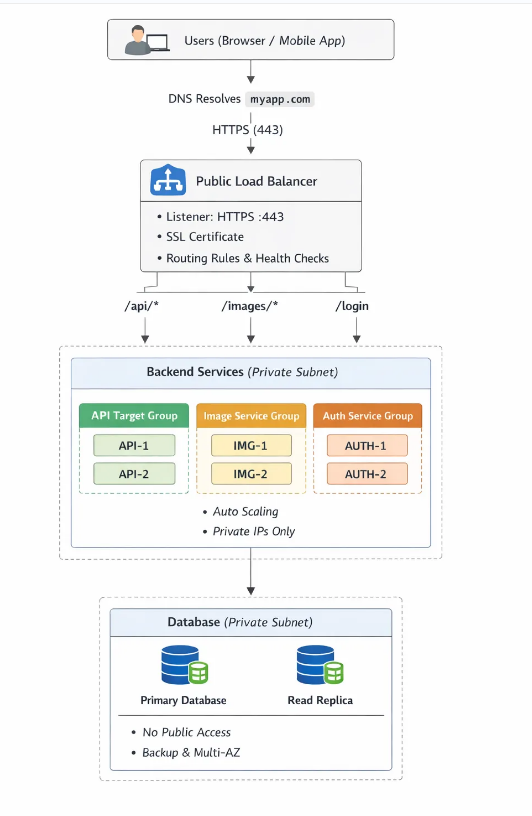
This has become the default architecture for startups, SaaS apps, and enterprise systems.
Step-by-step traffic flow
Let’s follow one real request. Imagine a user opens: https://myapp.com/api/users
Here’s what actually happens behind the scenes.
Step 1 — User hits the Load Balancer
The request first reaches the public IP/Private IP of the Load Balancer. Not your servers. Servers stay hidden inside private networks.This improves both security and control.
Step 2 — Listener accepts the request
The listener checks:
- port (80 or 443)
- protocol (HTTP/HTTPS)
If it’s HTTPS, the load balancer even handles SSL/TLS decryption. Backend servers don’t need to manage certificates.
Step 3 — Rules decide routing
Next, routing rules are evaluated.
For example:
/api/*→ API service/images/*→ image service/login→ auth service
This allows one single domain to serve many microservices.
Step 4 — Target group / backend pool selection
Now the load balancer selects a healthy server from the correct group.
Example: API Group: API-1 , API-2 , API-3
It chooses one using:
- round robin
- least connections
- or smart algorithms
If one server is unhealthy, it is automatically skipped.
Step 5 — Server responds
The backend server processes the request and sends the response back through the load balancer. Finally, the user receives the result. All of this happens in milliseconds. The user never knows multiple servers even exist.
What this architecture gives us
This simple flow solves many production problems:
- High availability → no single server failure
- Scalability → add/remove servers anytime
- Security → servers are private
- Performance → traffic distributed evenly
- Reliability → unhealthy servers removed automatically
Without the load balancer, all of this becomes manual and fragile.
How this connects to real cloud design
This pattern perfectly fits with modern cloud practices:
Common Interview Questions — Load Balancer
- What is a Load Balancer and why is it required in a production architecture?
- Explain the complete request flow from user to backend server through a Load Balancer.
- What are listeners, routing rules, and target groups in a Load Balancer?
- How do health checks and auto-scaling improve reliability and availability?
- What is the difference between Layer 4 and Layer 7 Load Balancers, and when would you use each?


