
Introduction
As applications move to the cloud, network design becomes very important.
In Microsoft Azure, one of the most recommended and widely used network designs is Hub and Spoke Architecture.
Azure Hub and Spoke architecture helps organizations build secure, scalable, and easy-to-manage cloud networks, especially when multiple applications and teams are involved.
In this article, we will explain Hub and Spoke Architecture in Azure in very simple words, with real use cases and best practices.
What Is Hub and Spoke Architecture?
Hub and Spoke is a network topology where:
- A central network (Hub) provides shared services
- Multiple isolated networks (Spokes) connect to the hub
Instead of connecting every network to every other network, all spokes connect only to the hub.
This design reduces complexity and improves security.
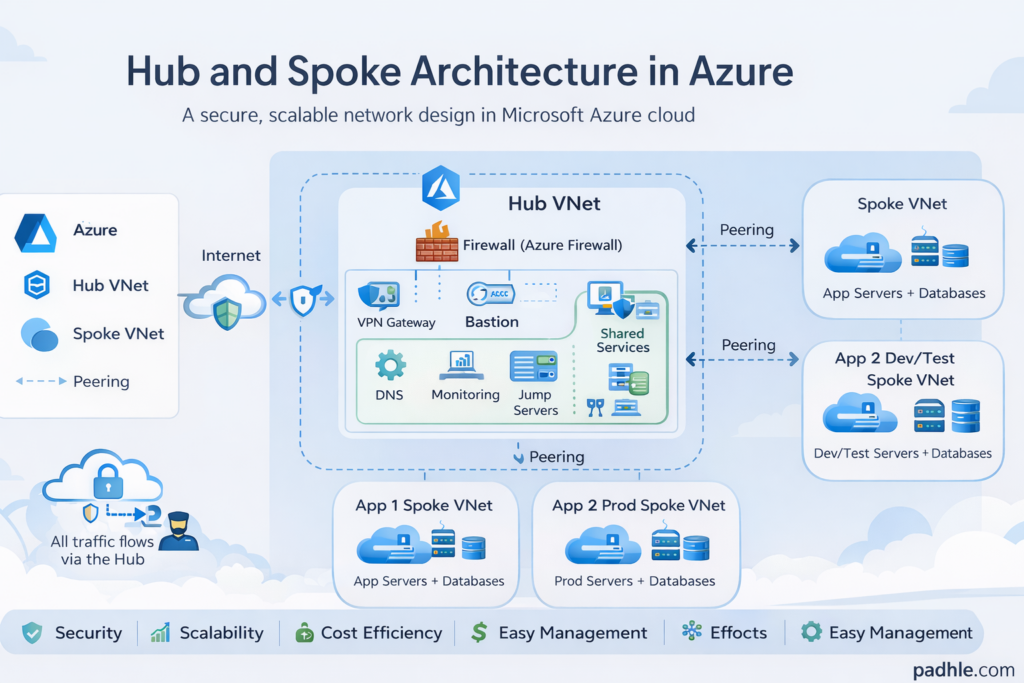
Simple Real-Life Example
Think of an airport system:
- Hub → Main international airport
- Spokes → Smaller regional airports
All flights go through the main airport instead of connecting every airport directly.
Azure networking works in the same way.
Core Components of Hub and Spoke Architecture
1. Hub Virtual Network (Hub VNet)
The Hub VNet is the central network.
It usually contains:
- Azure Firewall
- VPN Gateway or ExpressRoute
- Bastion
- Shared services (DNS, monitoring, jump servers)
👉 The hub acts as a security and connectivity center.
2. Spoke Virtual Networks (Spoke VNets)
Spokes are separate VNets for workloads.
Each spoke usually hosts:
- Applications
- Databases
- Dev / Test / Prod environments
- Different business units
👉 Spokes do not talk to each other directly (by default).
3. VNet Peering
VNet Peering connects:
- Hub ↔ Spokes
It allows:
- Private communication
- Low latency
- High bandwidth
Traffic between spokes is routed via the hub.
Why Do We Use Hub and Spoke Architecture in Azure?
1. Better Security
- Central firewall in the hub
- Controlled traffic flow
- Network isolation between workloads
If one spoke is compromised, others remain safe.
2. Easy Network Management
- Shared services in one place
- Central logging and monitoring
- Easier troubleshooting
Less duplication, more control.
3. Cost Optimization
- One firewall instead of many
- One VPN Gateway for all spokes
- Shared infrastructure reduces cost
4. Scalability
- New applications = new spokes
- No impact on existing networks
- Easy to scale as business grows
Traffic Flow in Hub and Spoke Architecture
Here’s how traffic usually flows:
- Internet → Hub → Spoke
- Spoke → Hub → Internet
- Spoke → Hub → Another Spoke
All traffic passes through the hub firewall, ensuring inspection and security.
Azure Services Commonly Used in Hub and Spoke
- Azure Virtual Network (VNet)
- Azure Firewall
- Azure VPN Gateway / ExpressRoute
- Azure Bastion
- Network Security Groups (NSGs)
- User Defined Routes (UDRs)
- Azure Monitor & Log Analytics
Hub and Spoke vs Flat Network
| Feature | Flat Network | Hub & Spoke |
|---|---|---|
| Security | Low | High |
| Scalability | Difficult | Easy |
| Management | Complex | Centralized |
| Cost | High (duplicate services) | Optimized |
| Enterprise Ready | ❌ | ✅ |
When Should You Use Hub and Spoke Architecture?
Use Hub and Spoke when:
- You have multiple applications
- You need strong network security
- You manage Dev / Test / Prod environments
- You want enterprise-grade Azure architecture
For small or single-app setups, this design may be overkill.
Best Practices for Azure Hub and Spoke Architecture
✔ Use Azure Firewall in the hub
✔ Apply NSGs at subnet level
✔ Use UDRs to force traffic via hub
✔ Separate Prod and Non-Prod spokes
✔ Enable logging and monitoring
✔ Use Private Endpoints for PaaS services
Common Mistakes to Avoid
❌ Allowing direct spoke-to-spoke traffic
❌ Deploying firewall in every spoke
❌ Mixing Prod and Dev in same spoke
❌ Missing UDR configuration
❌ No centralized monitoring
Hub and Spoke Architecture and DevOps
In DevOps environments:
- Each environment can be a separate spoke
- CI/CD pipelines deploy into spokes
- Security policies remain centralized
- Network stays consistent across environments
This makes deployments safer and repeatable.
Final Thoughts
Azure Hub and Spoke Architecture is a proven, enterprise-ready network design.
It helps teams build:
- Secure networks
- Scalable cloud platforms
- Well-governed Azure environments
That’s why it is widely used in real-world Azure and DevOps projects.
Is Hub and Spoke Architecture Used Only in Azure?
No. Almost all good and scalable cloud networking architectures follow the Hub and Spoke model, even if they use different names.
The core idea is always the same:
- One central network for security and connectivity
- Multiple isolated application networks
- Controlled traffic flow through the center
This design is followed across Azure, AWS, GCP, and even on-prem data centers.
Same Architecture, Different Cloud Names
| Concept | Azure | AWS | GCP | On-Prem |
|---|---|---|---|---|
| Central Network | Hub VNet | Transit VPC / Transit Gateway | Hub VPC | Core Network |
| App Networks | Spoke VNets | Application VPCs | Spoke VPCs | Segmented Networks |
| Connectivity | VNet Peering | VPC Peering / TGW | VPC Peering | Routers |
| Central Security | Azure Firewall | AWS Network Firewall | Cloud Firewall | Hardware Firewall |
👉 The pattern stays the same — only service names change.
Conclusion
In simple words:
👉 Hub = Central control and security
👉 Spokes = Isolated application networks
👉 Result = Secure, scalable, and manageable Azure architecture
If you are designing cloud networks in Azure , AWS , GCP or any CLoud , Hub and Spoke should be default choice.


