
The Problem We Faced
We were building a product with 10 microservices .We created 10 simple services:
- Auth Service
- User Service
- Product Service
- Order Service
- Payment Service
- Notification Service
- Inventory Service
- Search Service
- Review Service
- Gateway API
All were small APIs with independent logic.
At first, everything looked simple on paper.
But the real question was:
Where should we deploy these services so they scale, remain stable, and are easy to manage?
So we decided to test all major Azure options in real life.
First Try: Azure Web App – The “Easy” Start
We started with Azure Web App because it was fast to deploy and required almost no infrastructure work.
Attempt 1: All Services in One App Service Plan
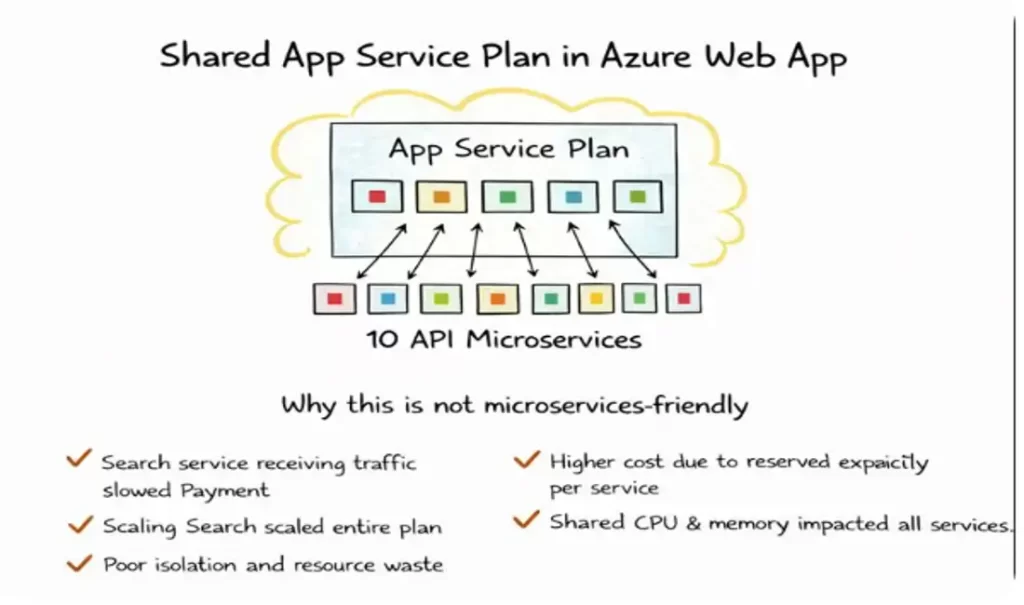
We deployed all 10 microservices under one App Service Plan.
At first, it looked perfect:
- One plan
- One bill
- Simple management
But soon problems came.
When Search service received heavy traffic,suddenly Payment service became slow.
Why? Because all services were sharing the same CPU and memory.
Scaling Search scaled everything.
We were paying for resources that only one service needed.
That is when we realized:
This is simple, but not microservices-friendly.
Attempt 2: One App Service Plan per Microservice

Then we said:
“Let us give each microservice its own App Service Plan.”
Now things improved:
- Each service scaled independently
- No more resource fights
- Better stability
Why New Issues Appeared When We Used One App Service Plan Per Microservice
When we moved each microservice to its own App Service Plan, technically things became better.
Each service was isolated and scaled independently.
But operational problems started appearing.
1. Cost Increased Quickly – What Really Happened
Earlier, one App Service Plan was shared by all services.
Now suddenly we had 10 App Service Plans.
Each plan needed:
- Minimum reserved CPU
- Minimum reserved memory
- Always-on pricing
Even if:
- A service had very low traffic
- Or ran only few requests per hour
We were still paying for the full plan.
So: Instead of paying for actual usage, we were paying for reserved capacity per service.
This made our cloud bill grow much faster than expected.
2. Managing 10 Plans Became Messy – In Real Operations
With 10 App Service Plans:
We had to:
- Monitor each plan separately
- Configure scaling rules per plan
- Manage alerts per plan
- Patch, secure, and audit each plan
- Track cost per plan
Simple tasks like:
- Changing TLS policy
- Updating diagnostic settings
- Applying tags
Now had to be done 10 times instead of 1.
Our DevOps team started spending more time managing infra than improving the system.
3. Still No OS-Level Control – Why It Matters
Even after separating plans, we were still using PaaS Web App.
Which means:
- We cannot choose the base OS image
- We cannot install custom system packages
- We cannot tweak kernel or OS settings
- We cannot use special network or low-level tools
But some of our services needed:
- Custom binaries
- Special libraries
- Non-standard runtime versions
And Web App simply did not allow that level of control.
So even with multiple plans,we were still limited by the platform.
4. Still Tightly Locked to Azure – Vendor Lock-In Reality
When we used Web App:
Our application became dependent on:
- Azure App Service runtime
- Azure-specific configuration
- Azure scaling and deployment model
If tomorrow we wanted to move to:
- AWS
- GCP
- On-Prem
We could not simply take the app and run it.
We had to:
- Redesign deployment
- Rewrite configs
- Rebuild pipelines
This reduced our architectural freedom.
Second Try: Azure Function App – The Serverless Hope

Next, we tried deploying services using Azure Function App.
We thought:
“It is serverless, auto-scales, and cheap — perfect!”
And yes, some things were great:
- No server management
- Automatic scaling
- Pay per execution
But soon reality hit.
We learned a big lesson:
Function App is amazing for event-driven tasks,
but not for full microservices platforms.
Why Azure Function App Struggled With Our 10 Microservices
At first, Function App looked perfect:
Serverless, auto-scaling, and cost-efficient.
But when we actually ran 10 real microservices on it, practical issues started coming.
Some Services Needed Long-Running Processes – What That Means
Some of our services were not short tasks.
For example:
- Order processing service
- Payment verification
- Report generation
- Data sync jobs
These services:
- Took minutes, not milliseconds
- Needed stable execution
- Could not stop midway
But Function Apps are designed for:
- Short-lived executions
- Quick response tasks
- Stateless operations
So when a function ran too long:
- It risked timeout
- It became expensive
- It was harder to manage reliability
Function Apps were simply not built for long-running business services.
Some Services Needed Constant Availability
Microservices like:
- Auth service
- User service
- Product service
Must be:
- Always warm
- Always responsive
- Ready 24×7
But in Function App:
- If no request comes for some time
- The function goes idle
- And when traffic returns → cold start happens
For core APIs, even 2–3 seconds delay was unacceptable.
This is fine for background jobs,but not for customer-facing APIs.
Stable Performance Was Hard to Maintain
Function Apps scale automatically, which is great.
But we observed:
- Performance varied under load
- Sudden spikes caused unpredictable latency
- Memory and CPU were not fully in our control
For microservices, we need:
- Predictable performance
- Controlled scaling
- Stable response time
This was difficult to guarantee in serverless-only architecture.
Problems We Faced in Real Operation
Now let us talk about the problems we started seeing.
Cold Starts – The Hidden Pain
Cold start means: When a function is idle and gets a new request,
Azure needs to:
- Allocate resources
- Load runtime
- Load code
- Then execute
This caused:
- First request latency
- Poor user experience
- Random slow APIs
For customer-facing microservices, this was a deal-breaker.
Hard-to-Debug Flows Across 10 APIs
When we had 10 Function-based APIs:
One user request could:
- Trigger 4–5 functions
- Across multiple services
- With async and event-based chaining
Debugging became difficult because:
- Logs were distributed
- Tracing across functions was complex
- Root cause analysis took more time
- Failures were not always visible in one place
With containers, we later got:
- Centralized logging
- Better tracing
- Easier root cause analysis
Managing 10 APIs Together Became Complex
Function Apps are simple when:
- You have few functions
- Or a few APIs
But with 10 microservices:
- Versioning became hard
- Deployment coordination was tricky
- Config management became complex
- Dependency tracking was painful
It stopped feeling “simple”.
Not All Services Fit Event-Driven Design
Function Apps work best when:
- Something happens → function runs
Example: - File uploaded
- Message arrived
- Timer triggered
But many microservices are:
- Always running APIs
- State-driven
- Request-response based
Forcing every service into:
- Event-based
- Trigger-based
model made the design unnatural.
We were bending our architecture to fit the platform,
instead of choosing the platform to fit the architecture.
Final Learning From Function App Experiment
We learned one clear thing:
Azure Function App is excellent for:
- Background jobs
- Event processing
- Lightweight tasks
But it is not meant to replace: A full microservices platform.
Third Try: Azure Container Apps – When Microservices Finally Started Making Sense
After struggling with Web App and Function App, we realized one thing clearly:
Our problem was not Azure.Our problem was how we were packaging and running our services.
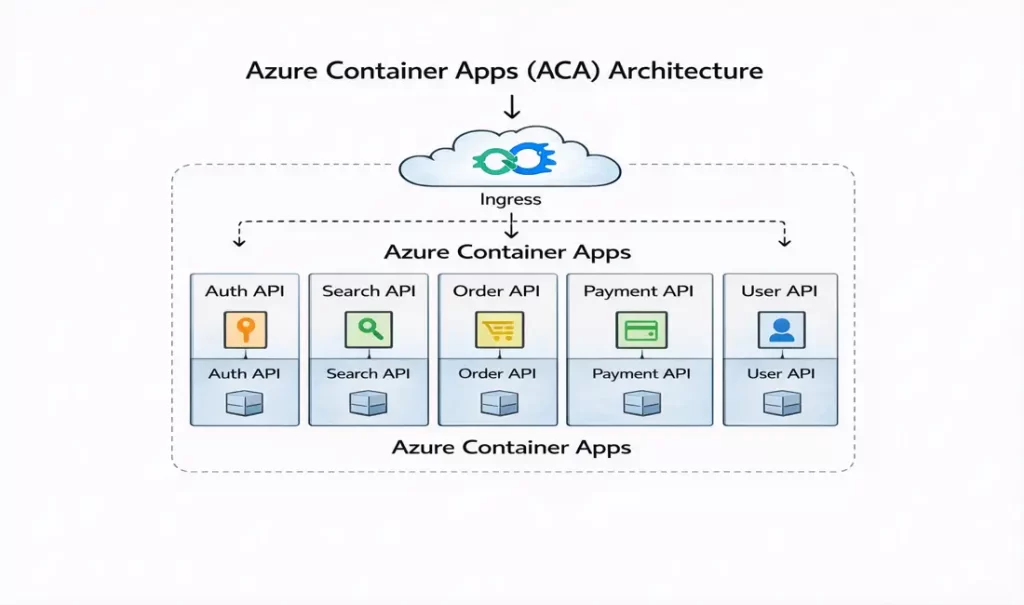
So we decided to move all 10 microservices into containers and deploy them on Azure Container Apps (ACA).
This was the turning point of our architecture journey.
What Changed the Moment We Moved to Containers
The change was not small.It was architectural.
For the first time, our system behaved the way microservices are actually supposed to behave.
Each Service Got Its Own Container – Real Isolation Finally Happened
Earlier, our services were always sharing something:
- Shared runtime in Web App
- Shared execution model in Function App
With containers: Each microservice became its own independent unit.
This meant:
- No dependency clashes
- No library conflicts
- No one service affecting another
- No hidden runtime surprises
When our Payment service had issues,
Search and User services continued working smoothly.
This was the first time failures became local instead of global.
Each Service Started Scaling Independently – Not the Whole System
Then we saw the biggest improvement.
Earlier:
- Scaling Search scaled everything
- Or scaling depended on triggers and execution patterns
With ACA:
Only the service that needed scaling actually scaled.
So:
- Search scaled during peak traffic
- Order service stayed stable
- Auth service remained light
Now scaling was tied to business behavior, not platform limitation.
This is exactly what microservices are meant to do.
No Resource Conflicts Anymore – Predictable Performance
Before containers:
One heavy service could starve others of CPU or memory.
With ACA:
Each container had its own resource boundaries.
This meant:
- One service could not eat resources of others
- Performance became predictable
- Random slowdowns disappeared
- Debugging became easier
Our DevOps team finally stopped firefighting performance issues.
Same Behavior in Dev, Test, and Prod – The Biggest Relief
Earlier:
Something that worked in Dev would behave differently in Prod.
With containers:
We ran the same container image everywhere.
So:
- No environment mismatch
- No last-minute surprises
- No “works in dev but fails in prod”
- Faster debugging
- Higher release confidence
This consistency alone justified our move to containers.
Why Containers Gave Us Cloud Freedom (Multi-Cloud & Portability)
One of the biggest changes after moving to containers was this:
Earlier, our applications were designed for Azure services.
After containers, our applications became designed for architecture, not for cloud.
What Changed in Reality
Before containers (Web App / Function App):
Our application was tightly coupled with:
- Azure App Service runtime
- Azure-specific configuration
- Azure scaling model
- Azure deployment patterns
Which meant: If tomorrow we wanted to move to:
- AWS
- GCP
- Or On-Prem
We could not simply take our app and run it.
We had to:
- Redesign deployment
- Rewrite configs
- Rebuild pipelines
- Re-test everything
This reduced our architectural freedom.
What Containers Gave Us
After moving to containers:
Our microservices became:
- Platform-independent
- Cloud-agnostic
- Portable by design
Now the same container image can run on:
On Azure:
- Azure Container Apps
- AKS
On AWS:
- ECS
- EKS
On GCP:
- GKE
On-Prem:
- Any Kubernetes or Docker environment
This gave us a huge strategic advantage.
Why This Matters in Real Enterprises
Because now:
- We are not locked to one cloud
- We can negotiate cost better
- We can follow data residency rules
- We can support disaster recovery across clouds
- We can future-proof our architecture
This is not just a technical benefit —
It is a business and strategy benefit.
No Kubernetes Complexity, But All Container Benefits
We were not ready for Kubernetes complexity yet.
ACA gave us:
- Containers
- Auto scaling
- HTTPS
- Load balancing
- Revisions
- Zero-to-hero deployment speed
Without:
- Managing nodes
- Writing complex YAML
- Handling cluster upgrades
- Dealing with pod scheduling
We finally got the power of containers without the operational burden of Kubernetes.
For a growing DevOps team, this was exactly what we needed.
Why Containers Finally Solved Our Core Problem
Because containers gave us what neither Web App nor Function App could give together:
✔ True isolation
✔ Independent lifecycle
✔ Independent scaling
✔ Runtime control
✔ Environment consistency
✔ Architecture freedom
And most importantly:
Containers allowed our architecture to drive the platform choice,
instead of the platform forcing our architecture.
Final Learning From Our Container Journey
We did not move to containers because they are modern.
We moved because our system became microservices, and microservices demand:
- Isolation
- Independent deployment
- Independent scaling
- Portability
- Predictability
And containers provide these by design.


