The Problem — Computers Do Not Understand Names
A developer types github.com into a browser. The page loads in one second. Simple.
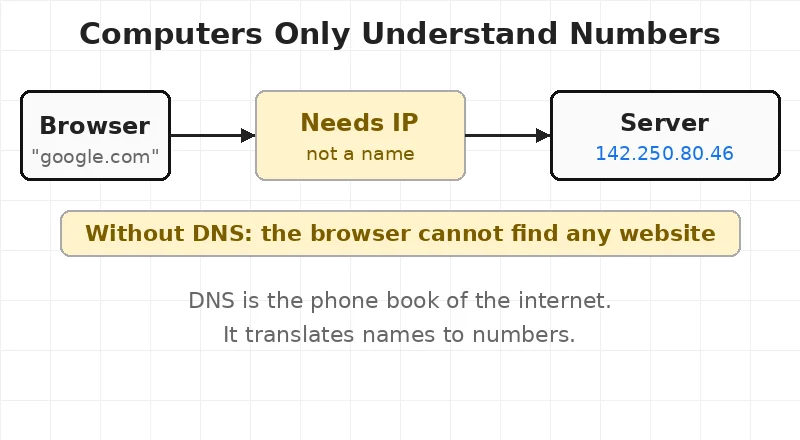
But computers do not understand names. Computers talk to each other using numbers. Every server on the internet has a number — called an IP address. GitHub’s server is at 140.82.121.4. Google’s is at 142.250.80.46.
Nobody memorizes those numbers. Nobody wants to.
Imagine typing 140.82.121.4 every time instead of github.com. The internet would be impossible to use.
There are over 359 million registered domain names as of 2025. Each one maps to a server number.
This is the exact problem DNS was built to solve.
For engineers, this means every website visit starts with a translation job before a single byte of the actual page loads.
🗺 What DNS Is — The Internet’s Phone Book
Think of an old phone book. A name goes in. A phone number comes out. Nobody calls the phone company to ask every time. The book is right there.
DNS — Domain Name System — works the same way. A domain name goes in. An IP address comes out.
DNS was created in 1983 by Paul Mockapetris. Before that, one single text file called HOSTS.TXT was shared across the internet. By 1982, it had grown so large it was breaking everything. DNS replaced it.
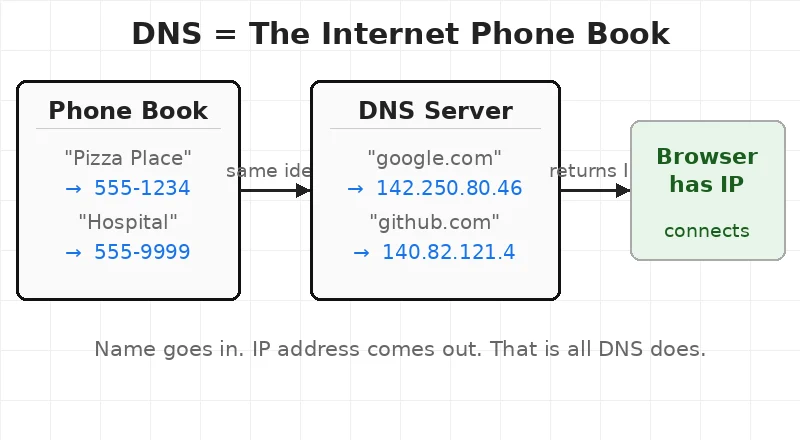
The lesson here is simple — DNS is not magic. It is a lookup service. The same lookup happens on every single website visit, every API call, every email sent.
🔑 Key Concepts — The 4 Players in Every DNS Lookup
DNS does not use one giant server. The job is split across four different players. Each one handles one piece of the question.
1. Recursive Resolver
The browser’s first call goes here. The recursive resolver — the lookup helper run by an internet provider — takes the question and does all the work. It asks other servers on the browser’s behalf.
Google runs a public resolver at 8.8.8.8. Cloudflare runs one at 1.1.1.1. Most home routers use the internet provider’s resolver by default.
2. Root Nameserver
The resolver does not know the answer right away. So it asks a root nameserver — the top of the DNS chain. There are 13 sets of root nameservers worldwide, managed by organizations like ICANN and NASA.
The root server does not know Google’s IP. But it knows who manages .com domains. It points the resolver there.
3. TLD Nameserver
TLD stands for Top-Level Domain — the .com, .org, .net at the end of a name. The TLD nameserver manages all domains under that extension.
Verisign is a company that manages all .com domain registrations on behalf of ICANN — the global body that controls domain names. Think of Verisign as the landlord of the entire .com neighbourhood. Every .com domain pays rent through them. Verisign runs the .com TLD nameserver. It handles over 160 million .com domains. It does not know Google’s IP. But it knows which nameserver is in charge of google.com specifically.
4. Authoritative Nameserver
The final player. The authoritative nameserver is the one that actually holds the answer. It has the real IP address for google.com. It sends that back to the resolver.
The resolver sends it to the browser. The browser connects. The page loads.
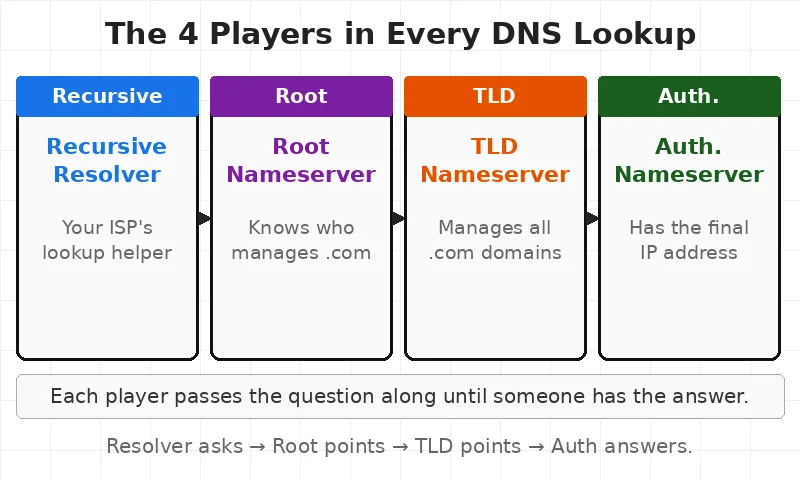
For engineers, this means DNS failures can happen at any of these four points — not just at the domain itself.
🧑💻 What Happens When a URL Is Typed — In Plain English
A user opens a browser. Types google.com. Hits Enter.
Here is what happens next — in the simplest way possible.
The browser has no idea where google.com lives. It only knows a name. Names mean nothing to the internet. So it needs to find the number — the IP address — before anything else.
Think of it like this. A person wants to call a friend. They know the friend’s name. But the phone needs a number. So they open the phone book. Find the number. Then call.
DNS is the phone book. The browser opens it. Looks up google.com. Gets back 142.250.80.46. Now the browser has a real address. It connects to that address. The server at that address sends back the webpage. The page appears on screen.
The entire lookup — name to number — happens in under 50 milliseconds. The user sees nothing. It feels instant.
But behind that one second, four different servers around the world worked together to answer one simple question: where is google.com?
For engineers, this means every app, every API call, every email — all of it starts with a DNS lookup before any real work begins. After DNS returns the IP, the request hits a load balancer — which decides which server actually handles it.
⚙️ How DNS Works — Step by Step
Here is the detailed breakdown of what happens inside that 50 milliseconds.
- Browser checks its own cache. The browser remembers recent lookups. If
google.comwas visited an hour ago, the IP is stored. No lookup needed. Done in microseconds. - Browser asks the operating system. If the browser cache is empty, the OS checks its own cache. It also checks a file called
hosts— a local override file engineers use for testing. - OS asks the recursive resolver. The resolver is usually set by the internet provider. The OS sends the domain name to the resolver and waits.
- Resolver works through Root → TLD → Authoritative. The resolver does the full chain. Root server → TLD server → Authoritative server. Each step returns a pointer to the next. The last one returns the real IP.
- IP returned to browser. The resolver sends the IP back to the OS. The OS gives it to the browser. The browser opens a connection to that IP. The page loads.
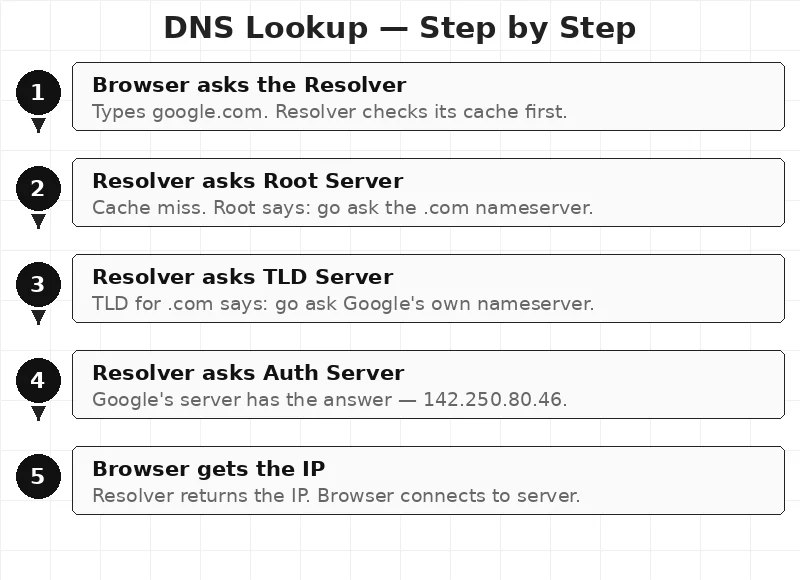
The lesson here is simple — the browser never talks to the root server directly. The resolver does all the heavy lifting.
🧠 How DNS Works Internally — Caching and TTL
Every DNS response comes with a timer. It is called TTL — Time To Live — measured in seconds. It tells every server along the chain how long to remember the answer.
Google sets its TTL at 300 seconds — 5 minutes. This means resolvers around the world cache Google’s IP for 5 minutes before asking again.
A small startup might set TTL at 86400 seconds — 24 hours. Resolvers keep that IP for a full day.
This is why DNS changes are slow. An engineer updates a domain to point to a new server. But resolvers around the world still have the old IP cached. They will not ask again until the TTL runs out. Engineers call this DNS propagation — and it can take 24 to 48 hours worldwide.
Just like caching in web apps saves database calls, DNS caching saves lookup calls. The trade-off is the same — speed versus freshness.
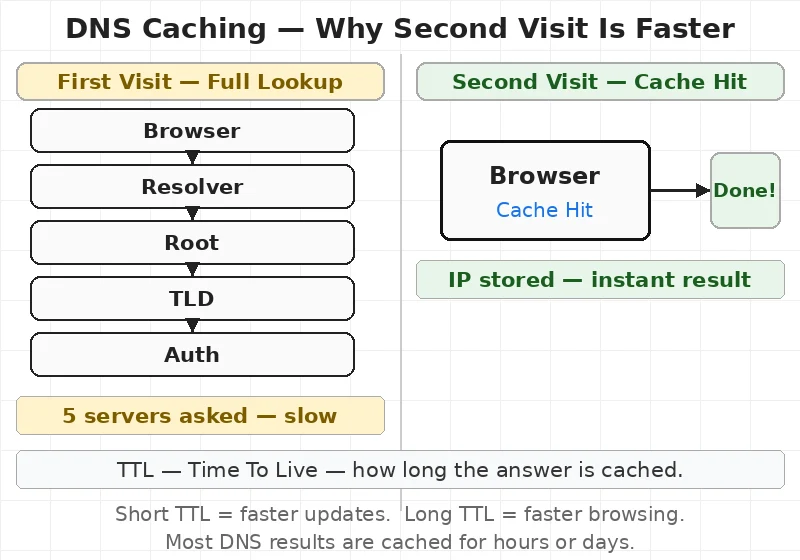
For engineers, this means testing DNS changes requires clearing the local cache — or waiting for TTL to expire.
🏢 Real Company Examples
Cloudflare runs the world’s largest DNS resolver at 1.1.1.1. It handles over 1 trillion DNS queries per day as of 2024. Cloudflare’s resolver answers in under 11 milliseconds on average — faster than most other resolvers.
Amazon Route 53 — AWS’s DNS service — routes traffic for millions of websites. Route 53 is designed to answer DNS queries in under 6 milliseconds globally. Engineers use it alongside a Layer 4 or Layer 7 load balancer to route traffic to the nearest server based on the user’s location.
Facebook’s 2021 outage is a famous DNS case. On October 4, 2021, Facebook accidentally removed the DNS records for its own domains. Facebook’s nameservers disappeared from the internet. The resolver chain had nowhere to send requests. Facebook, Instagram, and WhatsApp went down for 6 hours. The fix required engineers to physically enter a data center because remote access also relied on DNS.
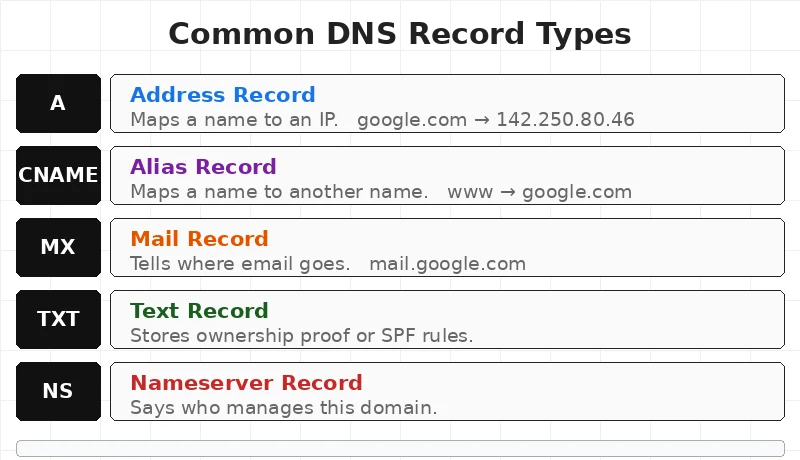
Any team running a domain on the internet is depending on DNS. Understanding it is not optional.
⚡ When To Use — What Engineers Need to Know
DNS knowledge matters when:
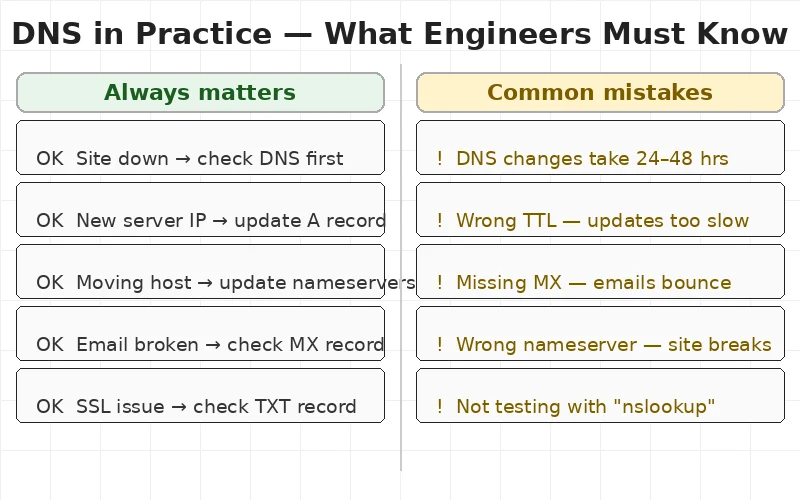
- A website goes down — DNS is the first thing to check
- Moving a site to a new server — the A record needs updating
- Setting up email — MX records must be correct
- Proving domain ownership — TXT records are required
- Building with multiple regions — DNS routes traffic to the nearest server
- Starting a DevOps career — DNS is a core concept in the DevOps engineer roadmap
Skip the deep dive when:
- The app runs on a local network — no public DNS needed
- All traffic goes through a fixed IP — no lookup required
- Internal services only — use a private DNS or
hostsfile
✅ Key Takeaways
- DNS translates names to numbers. Computers use IP addresses. Humans use domain names. DNS bridges the gap.
- Four players do the work. Resolver → Root → TLD → Authoritative. Each narrows the answer.
- Caching makes it fast. TTL controls how long the answer is stored. Short TTL = fresh. Long TTL = fast.
- DNS changes take time. Propagation can take 24–48 hours. Plan deployments around this.
- Five record types matter most. A, CNAME, MX, TXT, and NS cover nearly every use case.
- DNS failures cause real outages. Facebook’s 6-hour outage in 2021 was a DNS misconfiguration.
🎯 Interview Questions
- A website is down. The server is running fine. Where do engineers check first — and why?
- What is the difference between a recursive resolver and an authoritative nameserver?
- An engineer updates a domain to point to a new server. The old site still shows for some users 12 hours later. What is causing this?
- What does TTL mean in DNS — and what happens if it is set too low or too high?
- A company sets up a new domain. Emails are not being delivered. Which DNS record type is most likely missing?
This article is for educational purposes based on publicly available engineering resources.