Target Audience
This post is for backend engineers, DevOps engineers, and anyone preparing for system design interviews who wants to understand why some apps feel instant — and others feel slow.
What You Will Learn
You will understand how caching works, the 3 types every engineer must know — Redis, CDN, and Application Cache — and the mistakes that break systems at scale.
The Problem — Your Database Cannot Handle Everything
Imagine you run an e-commerce website.
Every time a user opens the homepage, your app does this:
- User opens the page
- App queries the database: “What are the top 10 products?”
- Database finds the data
- App sends it back to the user
This works fine with 100 users.
But what happens when 50,000 users open your homepage at the same time?
Your database receives 50,000 identical queries. For the exact same data. In the same minute.
The database slows down. Pages take 10 seconds to load. Users leave. Revenue drops.
Here is the problem: the answer to “What are the top 10 products?” does not change every second. It might change once every few hours.
So why are you asking the database 50,000 times?
This is exactly the problem caching solves.
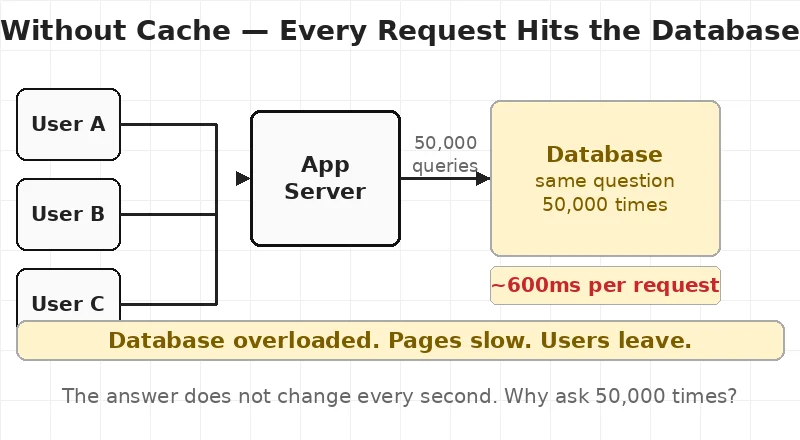
diag1_no_cache.webp — Without Cache: every request hits the database directly
What Is Caching?
Caching is simple.
Cache = a temporary storage that holds data so you do not have to fetch it again.
Instead of asking your database the same question 50,000 times, you ask it once, store the answer in a cache, and the next 49,999 requests read from the cache.
The cache is:
- Much faster than the database (milliseconds vs hundreds of milliseconds)
- In memory — stored in RAM, not on disk
- Temporary — data expires after a set time
Think of it like this: your database is a library. It has every book. But it takes time to find each book. Caching is like keeping the most popular books on your desk. You do not walk to the library every time. You just reach for what is already in front of you.
Chapter 1 — Application Cache (The Basics)
The simplest form of caching happens inside your application itself.
When your app gets a result from the database, it stores a copy in memory. The next request checks memory first. If the data is there — it returns it immediately. If not — it goes to the database and stores the result.
Cache Hit vs Cache Miss
Cache HIT — the data is in cache. Return it immediately. Fast.
Cache MISS — the data is not in cache. Fetch from database. Store in cache. Slow this time, fast next time.
The goal of every caching system is to maximize cache hits and minimize cache misses.
Cache Expiry — TTL
Every cached item has a TTL — Time To Live.
TTL tells the cache: “After X seconds, this data is stale. Delete it.”
| Data Type | Good TTL |
|---|---|
| Top products list | 1 hour |
| User session | 30 minutes |
| Live stock prices | 5 seconds |
If TTL is too long — users see outdated data. If TTL is too short — cache expires fast and the database gets hammered anyway.
Chapter 2 — Redis: The Most Popular Cache in the World
When engineers say “caching,” most of the time they mean Redis.
Redis stands for Remote Dictionary Server. It is an open-source, in-memory data store used as a cache, session store, and message queue.
Why Redis Is So Fast
Your database stores data on disk. Reading from disk takes time — we are talking about 100–800 milliseconds per query under load.
Redis stores everything in RAM. Reading from RAM is thousands of times faster. Redis responds in under 1 millisecond.
That is why a database query that takes 500ms becomes a 1ms Redis lookup after caching.
What Does Redis Store?
Redis is a key-value store. Think of it as a giant dictionary:
- Key: a unique string like
"top_products"or"user:1234:profile" - Value: any data — a string, number, list, or full JSON response
SET "top_products" "[{id:1, name:'iPhone'}, {id:2, name:'MacBook'}]" EX 3600
GET "top_products"
EX 3600 means: expire this key after 3600 seconds (1 hour).
Real Example — What Caching Actually Changes
Without Redis: User requests homepage → App queries DB → DB scans the table → Returns after ~600ms
With Redis: User requests homepage → App checks Redis → Redis finds the key → Returns after ~2ms
600ms → 2ms. That is the power of Redis.

diag2_with_cache.webp — With Redis Cache: the cache answers before the database is even asked
Chapter 3 — CDN: Caching for Static Files
So far we have talked about caching data — database results, API responses, user sessions.
But what about files? Images. CSS. JavaScript. Videos.
Every time someone opens your website, their browser downloads your logo, stylesheet, JavaScript bundle, and font files. If these are stored on a single server in Virginia, USA — and your user is in Mumbai — those files travel 13,000 kilometres to reach them.
CDN solves this.
A CDN — Content Delivery Network — is a network of servers placed in data centres around the world. Each server holds a cached copy of your static files.
When your user in Mumbai opens your website:
- Without CDN: file travels from Virginia → ~300ms
- With CDN: file comes from Mumbai CDN edge → ~8ms
Same file. 37 times faster.
What Does a CDN Cache?
✅ Images (JPG, PNG, WebP) ✅ CSS stylesheets ✅ JavaScript files ✅ Font files ✅ Videos and audio ✅ Static HTML pages
❌ Does NOT cache: user sessions, personalised content, real-time data, form submissions.
CDN Providers
- Cloudflare — most widely used, free tier available
- AWS CloudFront — tight integration with AWS services
- Azure CDN — integrates directly with Azure Blob Storage

diag3_cdn.webp — CDN Cache: static files served from the nearest edge server worldwide
Chapter 4 — All 3 Layers Working Together
In a real production system, you do not choose just one type of cache. You use all three together.
Here is how a single request flows through all three layers:
Request arrives from user:
Layer 1 — CDN Is this a static file? → YES → Return from nearest CDN edge. ~5ms. Done. No → Pass to app server.
Layer 2 — Application Cache Has this response been computed recently? → YES → Return cached. ~10ms. Done. No → Check Redis.
Layer 3 — Redis Is the data in Redis? → YES → Return. ~2ms. Done. No → Query the database. Store in Redis. Return.
Database — Last Resort Only reached when all three layers miss. This is exactly what you want.
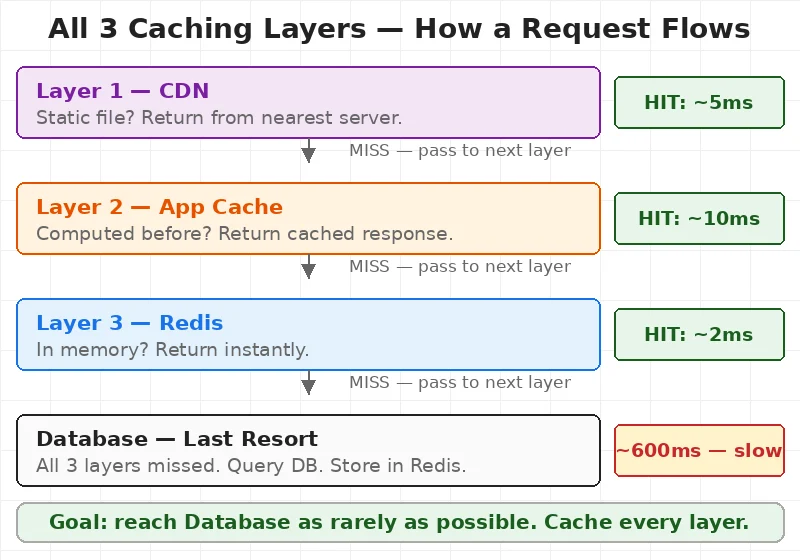
diag4_full_arch.webp — Complete Caching Architecture: all 3 layers with response times
This is the architecture that makes apps like Instagram, Swiggy, and Amazon feel instant — even under millions of requests per minute.
If you want to understand how traffic is distributed before it even reaches the cache, read our post on How Load Balancers Work. Caching and load balancing are the two most important performance tools every engineer must understand.
Chapter 5 — 3 Caching Mistakes That Break Systems
Most developers know what caching is. Fewer know what goes wrong.
Mistake 1 — Same TTL for All Data
A product description changes once a month. A live match score changes every second. Caching both with a 1-hour TTL means your match scores are stale and your products are regenerated far too often.
Fix: Set TTL based on how often data actually changes — not a single value for everything.
Mistake 2 — Cache Stampede
Your Redis key for “top products” expires at 2:00 PM. At exactly 2:00 PM, 10,000 users are on your homepage. All 10,000 get a cache miss simultaneously. All 10,000 query the database at once. Your database crashes.
This is called a cache stampede — also known as the thundering herd problem.
Fix: Refresh the cache slightly before expiry using one background process, not thousands of user requests.
Mistake 3 — Caching User Data Without a Unique Key
A developer caches the homepage with key "homepage". User A logs in and gets their personalised version cached. User B logs in and gets User A’s data returned to them.
Security disaster.
Fix: Always include user identity in cache keys for personalised data.
WRONG: SET "homepage" ...
RIGHT: SET "homepage:user:1234" ...
Redis on Azure and AWS
If you are on the cloud, you do not need to manage Redis yourself.
Azure: Use Azure Cache for Redis — fully managed, choose Basic, Standard, or Premium tier. Azure handles setup, patching, and high availability.
AWS: Use Amazon ElastiCache for Redis — same idea. Managed Redis with auto-failover and Multi-AZ support.
Both handle millions of requests per second in production.
For Azure architects: Azure Cache for Redis fits naturally as a shared service in Hub and Spoke Architecture. Read our Hub and Spoke Architecture post to see how shared services like Redis sit in the Hub and serve all Spoke environments.
Quick Reference
| Situation | Cache to Use |
|---|---|
| Images, CSS, JS loading slow | CDN |
| Database queries are slow | Redis |
| User sessions | Redis |
| Full API response caching | Redis |
| Same computation running repeatedly | Application Cache |
| Website serving users globally | CDN |
Common Interview Questions
Q: What is the difference between Redis and a database? A database stores data permanently on disk. Redis stores data temporarily in RAM. Redis is much faster but not permanent. Use Redis for speed, database for durability.
Q: What is cache eviction? When Redis runs out of memory, it deletes old data to make room. The most common policy is LRU — Least Recently Used. The data accessed least recently is deleted first.
Q: When should you NOT cache something? Do not cache real-time data that must always be fresh, user-specific data without unique keys, or write-heavy data that changes on every request.
Q: What is cache invalidation? Cache invalidation means removing or updating cached data when the original data changes. It is one of the hardest problems in distributed systems — invalidate too early and you lose performance, too late and users see wrong data.