🚨 The Problem
I saw a login form once. No padlock. No HTTPS.
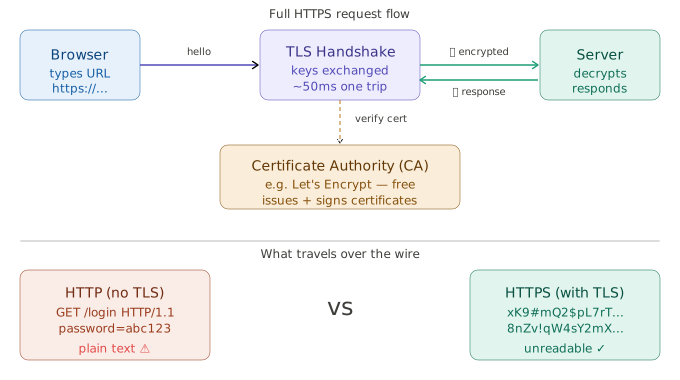
I ran a quick test. The password was plain text. Anyone on the same Wi-Fi could read it.
The site had been live for two years.
Most people see the padlock and move on. Few know what it does.
This is the exact problem HTTPS was built to solve.
🔒 What Is HTTPS?
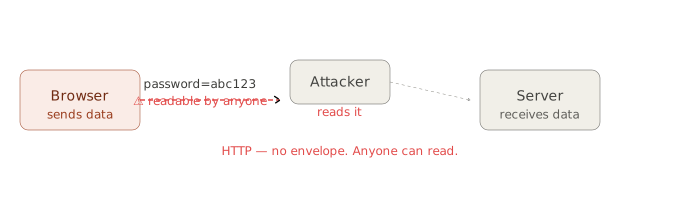
Think of a letter. No envelope. Anyone can read it.
That is HTTP. No lock. Plain text.
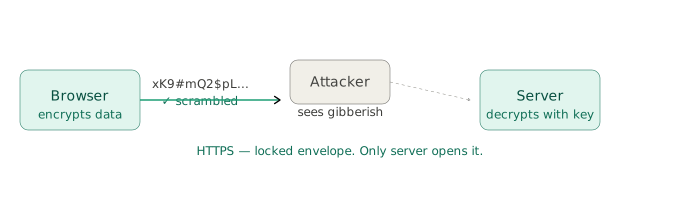
HTTPS puts the letter in a locked box. Only the server has the key.
The lock is called TLS — Transport Layer Security. TLS scrambles the data before it travels.
The padlock in the browser means TLS is on.
🧩 Three Things To Know
1. The Certificate
Every HTTPS site has a certificate. Think of it like a passport.
It proves the site is real. It also holds the public key.
Let’s Encrypt is a free tool that gives certificates to websites. Over 300 million sites use it.
2. Two Keys — Public and Private
There are two keys.
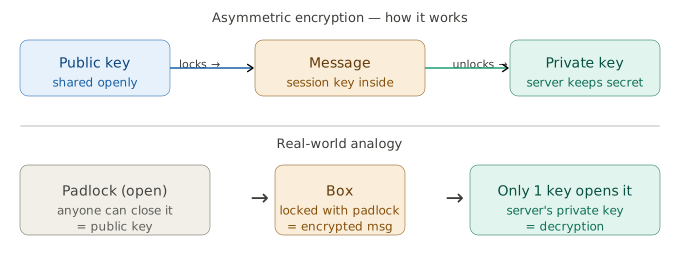
The public key is like a padlock anyone can close. The private key is the only key that opens it.
The server shares its public key. The browser locks a message with it. Only the server opens it.
3. The Session Key
After the two keys do their job — both sides switch to one shared key.
This is called a session key — one key, both sides use it.
It is much faster. The rest of the connection uses it.
⚙️ How It Works — Step by Step
Before any data moves — the browser and server shake hands. This is called the TLS handshake.
It takes about 50ms on a fast connection. That is faster than a blink.
After that — every message is locked. The attacker sees nothing.
For engineers, this means how DNS works and HTTPS always go together. DNS finds the server. HTTPS locks the connection.
From experience: The most common mistake is mixing HTTP and HTTPS on the same site. One unlocked image or script — and the browser shows a warning. Always redirect all HTTP traffic to HTTPS at the server level.
🏢 Real Companies Using This
Google moved all search to HTTPS in 2014. Then Google started giving a small ranking boost to HTTPS sites. Every big site followed.
Cloudflare — a company that handles internet security for websites — handles TLS for millions of sites. It does the handshake on behalf of the server. This makes sites faster.
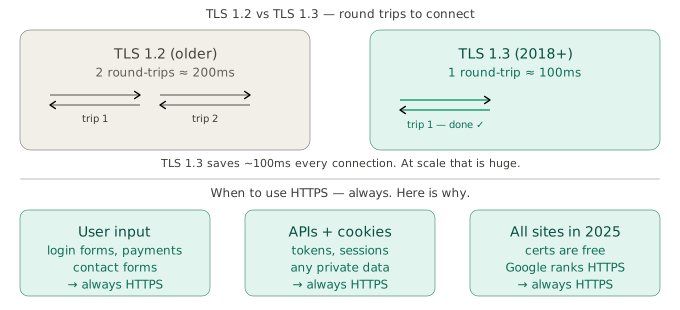
Facebook serves billions of HTTPS requests every day. Engineers there use TLS 1.3 — the latest version, released in 2018. It cuts setup from 2 round trips down to 1. That saves about 100ms per connection.
Just like caching saves database calls, TLS sessions can be reused too. The browser remembers a past session. The handshake is skipped next time.
✅ When To Use HTTPS
Use HTTPS for everything. No exceptions.
- Any form that takes a password or card number
- Any site that stores a login session
- Any API that sends or gets private data
- Any admin panel or tool
Certificates are free. Setup takes minutes. There is no good reason to skip it.
Engineers building CI/CD pipelines should check for valid HTTPS as part of the build. A broken cert should stop the deploy — not go live.
📋 Key Takeaways
- HTTP sends plain text. Anyone can read it.
- HTTPS locks the data with TLS. Only the server reads it.
- A certificate proves the server is real.
- The handshake sets up the session key. Fast encryption takes over after.
- TLS 1.3 (2018) does it in one trip. About 100ms.
Any system with a load balancer in front of users must handle TLS right. Get this wrong and user data is exposed.
Numbers in this post are based on public data as of 2025.