The Problem — One Database Does Not Fit Everything
A startup builds its first product. One database. Everything goes in. User accounts, orders, logs, notifications — all in one place.
Traffic grows. New features arrive. The team adds a social feed. Now every user has posts, likes, comments, and followers. The data does not fit neatly into rows and columns anymore.
The database slows down. Queries take 10 seconds. Users leave.
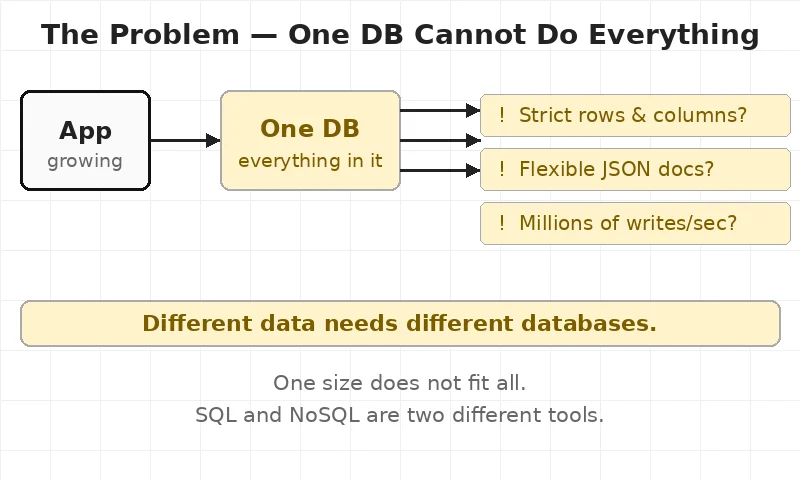
The team had picked one type of database at the start. They never asked: what kind of data are we storing? That one question changes everything.
This is the exact problem engineers face when they choose the wrong database type.
For engineers, this means database choice is not about preference. It is about what the data looks like.
🗂 What SQL and NoSQL Are — The Filing Cabinet vs The Sticky Notes Board
Think of two ways to organise an office.
Option 1: A filing cabinet. Every document goes in a labelled folder. Every folder has the same shape — name, date, reference number. Strict. Predictable. Easy to search.
Option 2: A sticky notes board. Every note can look different. One note has a photo and ten tags. The next note has just one word. No rules. Fully flexible.
SQL — Structured Query Language — is the filing cabinet. Data goes into tables. Every row has the same columns. Rules are enforced. Nothing goes in without a proper place.
NoSQL — Not Only SQL — is the sticky notes board. Data goes in as documents, key-value pairs, or graphs. Each record can look completely different. Flexible by design.
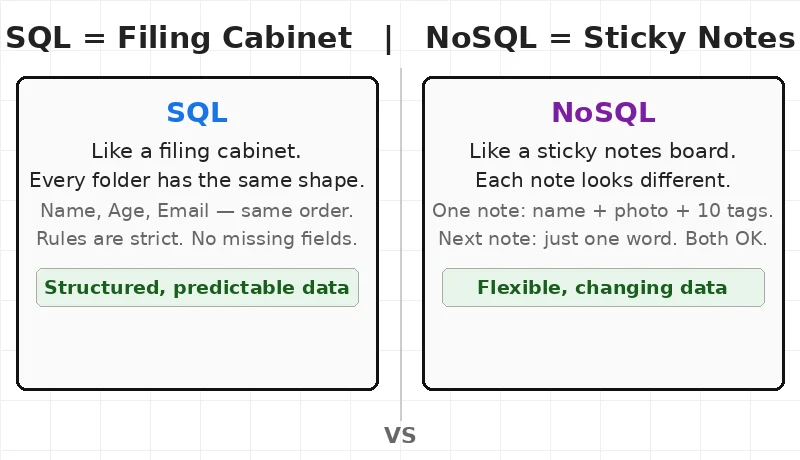
The lesson here is simple — neither is better. They are tools. A hammer is not better than a screwdriver. It depends on the job.
🔑 Key Concepts — How Each One Stores Data
1. SQL — Tables, Rows, Columns
SQL databases store data in tables. Think of a spreadsheet. Each table has fixed columns — ID, Name, Email, Age. Every row must fill those columns. Missing data breaks the rules.
MySQL is one of the most used SQL databases. It powers over 40% of websites worldwide including WordPress. PostgreSQL is the choice for teams that need strict rules and complex queries — banks use it, billing systems use it.
The power of SQL is in relationships. One table links to another. A user table links to an orders table. One query can pull data from both at once. This is called a JOIN — connecting two tables by a shared ID.
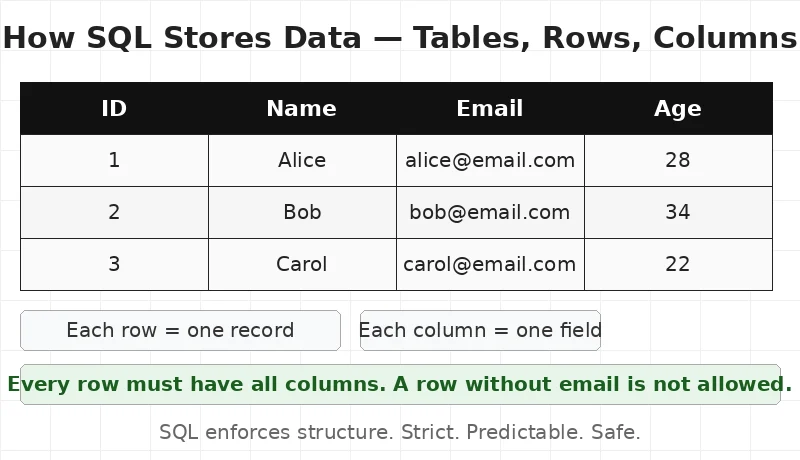
2. NoSQL — Documents, Keys, Graphs
NoSQL databases store data in different formats. The most common is a document — a blob of data in JSON format. Think of JSON as a labelled box. One box has a name, email, and 10 tags. The next box has just a name. Both are valid.
MongoDB is the most popular document database. It stores each record as a JSON document. No fixed columns. No required fields. A user profile can have 3 fields or 30 fields — the database does not care.
Redis is a different type of NoSQL — a key-value store. It works like a dictionary. A key goes in. A value comes out. Redis is extremely fast because it stores everything in memory — not on a hard drive. Engineers use it for caching session data and shopping cart contents.
Cassandra — built at Facebook in 2008 — is designed to handle millions of writes per second. It spreads data across many servers. No single server holds everything. If one server fails, the others keep running.
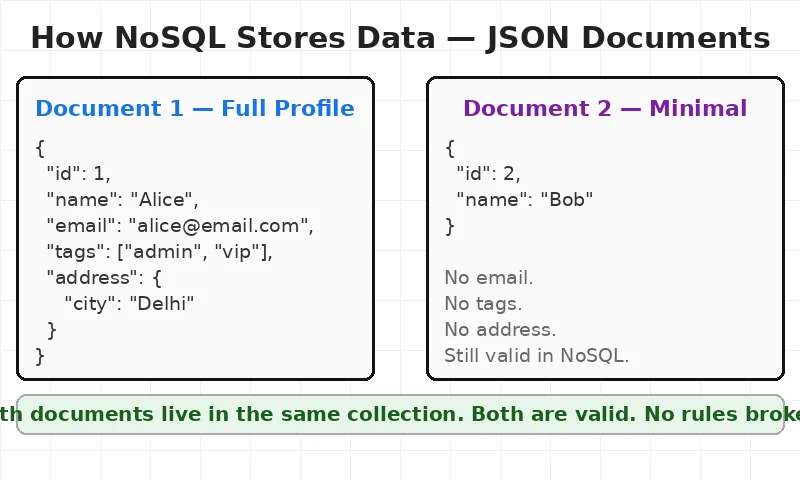
For engineers, this means NoSQL trades strict rules for speed and flexibility. The choice depends on what the data needs.
⚙️ How They Work Differently — Scale and Structure
SQL and NoSQL handle growth in opposite ways.
SQL scales up — when the database needs to handle more traffic, engineers move it to a bigger server. More RAM. More CPU. One powerful machine. This works well up to a point. But big servers are expensive. And there is a limit to how big one machine can get.
NoSQL scales out — when the database needs to handle more traffic, engineers add more servers. The data spreads across all of them. 10 servers, 100 servers, 1000 servers. Each one handles a piece of the load. This is the same idea behind a load balancer — no single machine carries all the weight. This is how companies like Netflix and Amazon handle billions of requests per day.
SQL also uses ACID rules — Atomicity, Consistency, Isolation, Durability. This means: either a transaction completes fully, or it does not happen at all. A bank transfer either moves money from Account A to Account B — or neither account changes. No half-transfers. No lost money.
NoSQL uses eventual consistency. A write goes to one server. It spreads to the others over time. For a fraction of a second, different servers may show different values. For a social media post, this is fine. For a bank transfer, it is not.
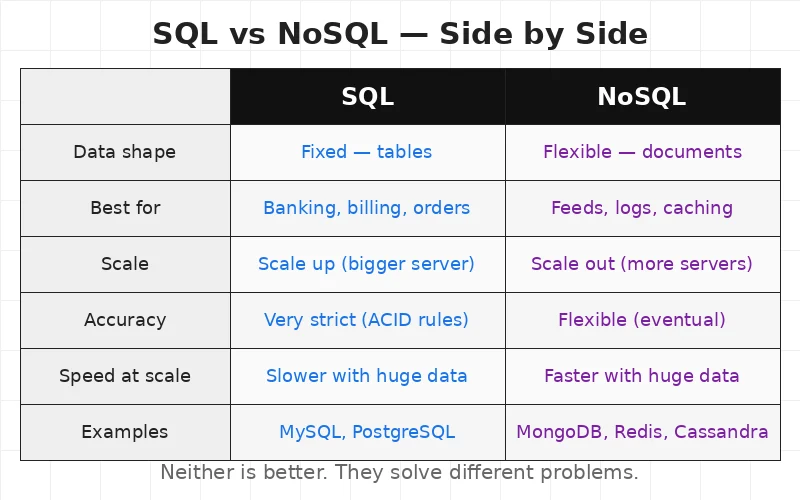
The lesson here is simple — ACID rules make SQL safe. Scale-out makes NoSQL fast. Pick based on what the app needs most.
🏢 Real Company Examples
Banks and payment systems — almost all use SQL. PostgreSQL powers financial data at companies like Instagram and Spotify. Transactions must be exact. ACID rules are not optional when real money is involved.
Amazon — DynamoDB is Amazon’s NoSQL database, launched in 2012. It handles over 1 million requests per second during peak shopping days like Black Friday. DynamoDB automatically spreads data across servers. No manual setup needed.
Netflix — Apache Cassandra stores the viewing history of over 300 million users. Each user generates dozens of events per session — plays, pauses, skips. Cassandra handles millions of writes per second without slowing down. Just like caching in web apps reduces database load, Netflix uses Cassandra specifically because it is built for high write volume.
WhatsApp — uses MySQL (SQL) to store messages. Simple, reliable, well understood. At 2 billion users, WhatsApp still trusts SQL because message data has a fixed structure — sender, receiver, timestamp, content.
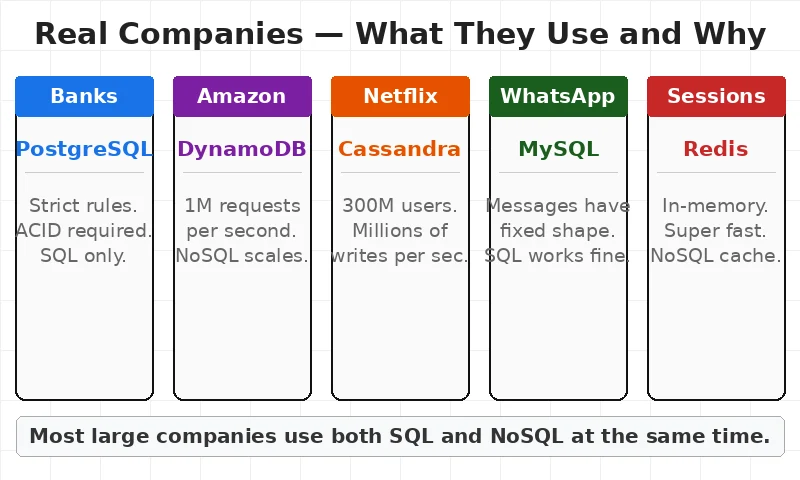
Any team building at scale needs to know this — most large companies use both SQL and NoSQL at the same time. Different services. Different data. Different tools.
⚡ When To Use — SQL or NoSQL?
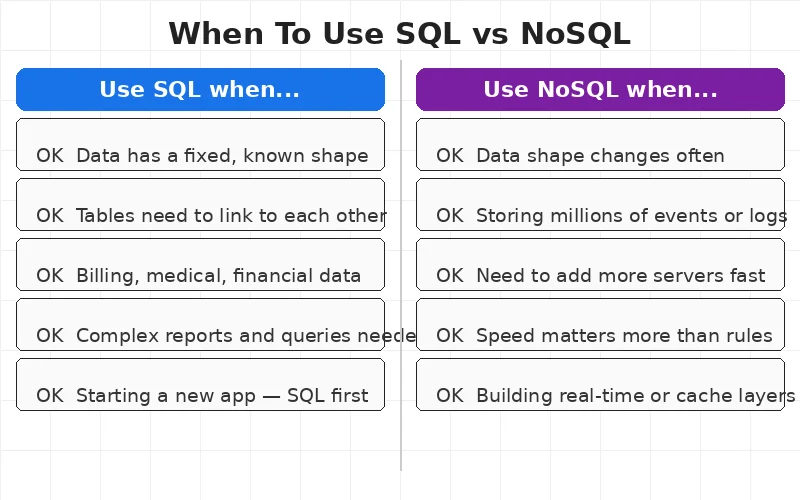
Use SQL when:
- Data has a fixed, known shape — users, orders, products
- Relationships between records matter — orders linking to users
- Accuracy is critical — billing, medical records, financial data
- The team needs complex queries and reports
- The app is being built for the first time and the data model is clear
- Engineers learning databases as part of a DevOps or backend roadmap — SQL is the right starting point
Use NoSQL when:
- Data shape changes often or is not yet known
- Storing millions of events, logs, or activity feeds
- The app needs to scale to many servers fast
- Speed matters more than strict rules
- Building real-time features, caching, or session storage
Use both when:
- SQL handles the core data — users, orders, payments
- NoSQL handles everything fast and flexible — feeds, notifications, cache
✅ Key Takeaways
- SQL stores data in tables. Fixed columns. Every row follows the same shape. Great for structured, predictable data.
- NoSQL stores data in documents or key-value pairs. Each record can look different. Great for flexible or changing data.
- SQL scales up. NoSQL scales out. SQL moves to a bigger server. NoSQL adds more servers.
- SQL uses ACID rules. Transactions are safe and exact. Banks and billing systems depend on this.
- NoSQL trades rules for speed. Eventual consistency is fine for social feeds and logs. Not for money.
- Most large companies use both. SQL for core data. NoSQL for speed, scale, and flexibility.
🎯 Interview Questions
- A team is building a banking app. A colleague suggests MongoDB. What questions should the engineer ask before deciding?
- What does ACID mean — and why do SQL databases use it?
- An app stores user profiles. Some users have 3 fields. Some have 50 fields. Which database type fits better — and why?
- What is the difference between scaling up and scaling out? Which approach does SQL use and which does NoSQL use?
- A startup uses only MySQL. Traffic grows to 10 million users. The database slows down. What are two options the team could explore?
This article is for educational purposes based on publicly available engineering resources.