😤 The Day Our Server Went Down
We launched a new feature. Put it on Product Hunt.
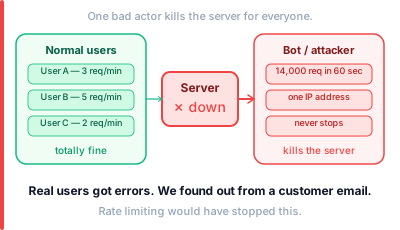
Within 20 minutes — the server was dead.
Not from real users. From bots scraping our API. One IP address sent 14,000 requests in 60 seconds. Our database could not handle it. Everything went down. Real users got errors.
We added rate limiting that evening. Never had that problem again.
If you have ever built an API — or plan to — this is something you need to understand before you get that phone call.
🚦 What Rate Limiting Actually Is
A bouncer at a club.
The club has 200 people inside. Capacity is 200. New people keep arriving.
The bouncer does not let everyone in at once. He controls the flow. One in, one out. If you are causing trouble — you are out and you cannot come back for an hour.
Rate limiting does the same thing for your API.
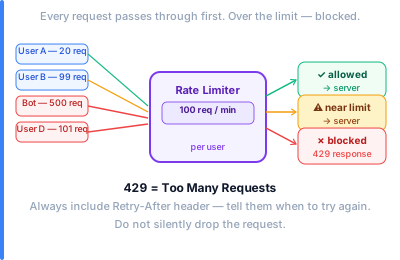
It controls how many requests a client can make in a given time. Too many? You get blocked. Wait a bit. Try again.
That is it. Nothing more complicated than a bouncer.
Rate limiting protects your server from being overwhelmed — whether that is from a bot, a bug in someone’s code, or just one very enthusiastic user.
🧮 The Four Algorithms
This is where most posts get complicated. I will keep it simple.
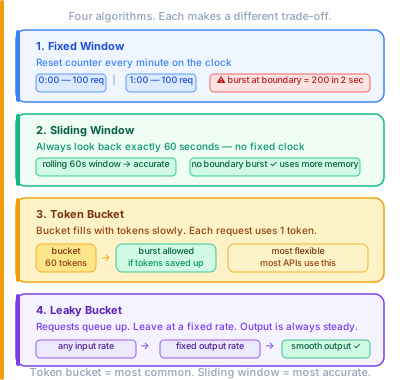
There are four main ways to implement rate limiting. Each works differently. Each has trade-offs.
1. Fixed Window
Divide time into fixed windows. One minute each.
“100 requests per minute.” The counter resets every minute on the clock. 9:00:00 to 9:01:00. Then reset. 9:01:00 to 9:02:00.
Simple. Easy to understand. But there is a problem.
Someone sends 100 requests at 9:00:59. Counter resets. Sends another 100 at 9:01:01. That is 200 requests in 2 seconds. Your limit said 100 per minute — but the window boundary allowed a burst.
2. Sliding Window
Instead of fixed clock windows — use a rolling window.
“100 requests in the last 60 seconds.” Not “per minute.” In the last 60 seconds. Always.
Every time a request comes in — look back exactly 60 seconds. Count the requests. If under 100 — allow. If over — block.
No boundary problem. Smoother. More accurate. Uses more memory because you have to track timestamps.
3. Token Bucket
Imagine a bucket. It fills with tokens over time. One token per second. Bucket holds 60 tokens maximum.
Each request uses one token. No tokens left — request blocked.
Bucket fills back up at a steady rate. But if you have tokens saved up — you can burst. Send 60 requests at once if your bucket is full.
This is what most APIs use. It allows natural bursts. A user doing something intensive for a moment is fine. A user hammering the API forever is not.
4. Leaky Bucket
Similar to token bucket — but the output is always steady.
Requests come in at any rate. They sit in a queue. They leave at a fixed rate. Like water dripping through a hole.
Useful when you need a perfectly smooth flow to your backend. No bursts. No spikes.
🏗️ Where It Lives In Your System
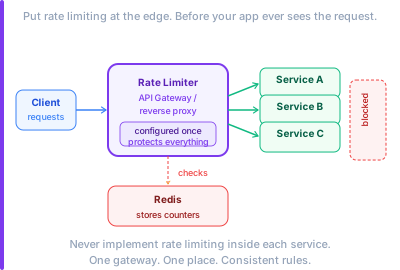
Rate limiting sits at the front. Before your application code even sees the request.
Usually in one of these places:
The API Gateway — the most common place. Your API Gateway sits in front of everything. You configure rate limiting rules there. Done once. Applies to all services behind it.
A reverse proxy — like NGINX or Cloudflare. One line of config. All traffic runs through it.
Your application code — the worst place. Each service has to implement it separately. Gets out of sync. Avoid this.
🗄️ How It Stores the Count
This is the part most explanations skip.
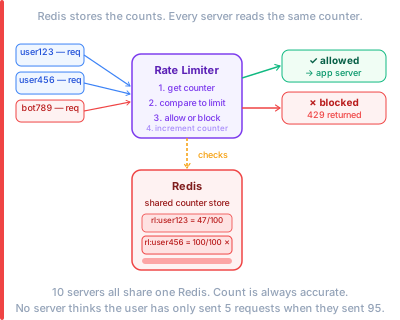
Rate limiting only works if it remembers how many requests a user has sent. That memory has to be fast. Shared. Consistent.
That is why almost every production rate limiter uses Redis.
Redis is an in-memory database. It is extremely fast. And it can be shared across multiple servers.
Here is how it works:
- Request comes in from user
abc123 - Rate limiter checks Redis key
rl:abc123 - Redis says: 47 requests in the last 60 seconds
- Under the limit of 100 — allow the request
- Increment the counter in Redis
If you have 10 servers — they all talk to the same Redis. The count is always accurate. No server thinks the user has only sent 5 requests when they have really sent 95.
🏢 Real Examples
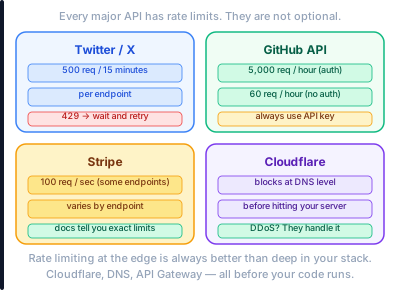
Twitter / X — their API has strict rate limits. 500 requests per 15 minutes for most endpoints. Hit the limit — you get a 429 Too Many Requests response. Your app has to wait.
GitHub API — 5,000 requests per hour for authenticated users. 60 per hour for unauthenticated. This is why scrapers use API keys — to get the higher limit.
Stripe — rate limits vary by endpoint. Some endpoints allow 100 requests per second. Others much less. Their docs tell you exactly what to expect.
Cloudflare — applies rate limiting at the DNS level before traffic even reaches your servers. A DDoS attack sending millions of requests — Cloudflare blocks most of it before your server ever sees it.
This is why the API Gateway and DNS layers matter so much. Rate limiting at the edge is always better than rate limiting deep in your stack.
✅ When You Need It
You need rate limiting the moment you expose anything to the internet.
That is not an exaggeration. An API with no rate limiting is an API waiting to be abused.
Use it when:
- You have a public API
- You are charging per request and need to enforce quotas
- You want to protect against DDoS attacks
- You want to stop one buggy client from taking down your service for everyone else
- You have login endpoints that could be brute-forced
The response code when you block someone is always 429 Too Many Requests. Include a Retry-After header. Tell them when they can try again. Do not just drop the request silently — that is rude and makes debugging impossible.
Engineers setting up CI/CD pipelines should test rate limiting as part of their pipeline. A load test that hits the rate limit and confirms a 429 is returned — not a 500 — is a good test to have.
Before You Go
Our server went down because we launched without rate limiting.
We fixed it in two hours. Added rate limits at the API Gateway. Deployed. Everything was stable again.
The bot was still there. Sending thousands of requests per minute. But now it was just getting 429 responses. Our server did not care. Our real users had no idea anything had happened.
That is the point of rate limiting. Not to stop people. To stop people from hurting everyone else.
Numbers and examples in this post are based on public data as of 2025.