
The Problem — Apps That Can’t Talk
Imagine a food delivery app.
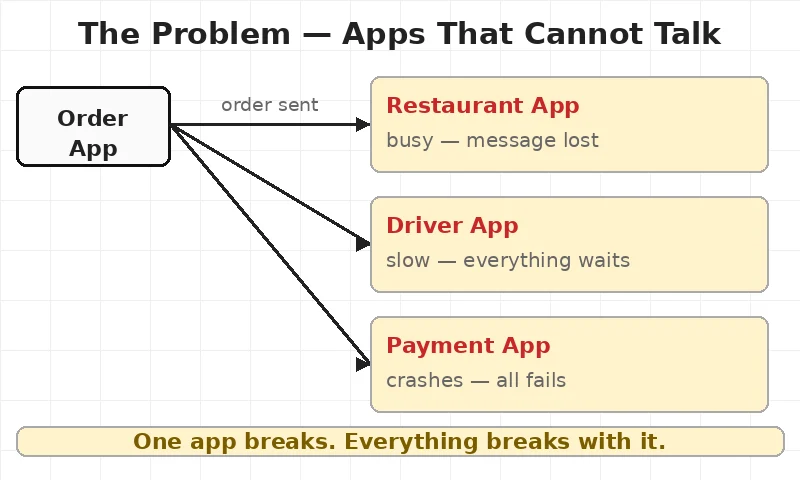
A customer places an order. Three things must happen at once:
- The restaurant needs to see the order.
- The driver app needs to find a driver.
- The payment app needs to charge the customer.
Simple enough. Now imagine 10,000 orders come in at once.
The app sends a message to the restaurant. It’s busy. Message gone.
A message goes to the payment app. It’s slow. The app waits. Everything slows down.
One app breaks. Everything breaks with it.
Apps break for the same reason caching exists — one slow part makes everything slow.
This is the exact problem Kafka was built to solve.
📬 What is Apache Kafka?
Apache Kafka is a tool that sits between apps. It holds messages. It never loses them.
Each app sends its message to Kafka. Other apps read from Kafka when they are ready. Nobody waits. Nothing breaks.
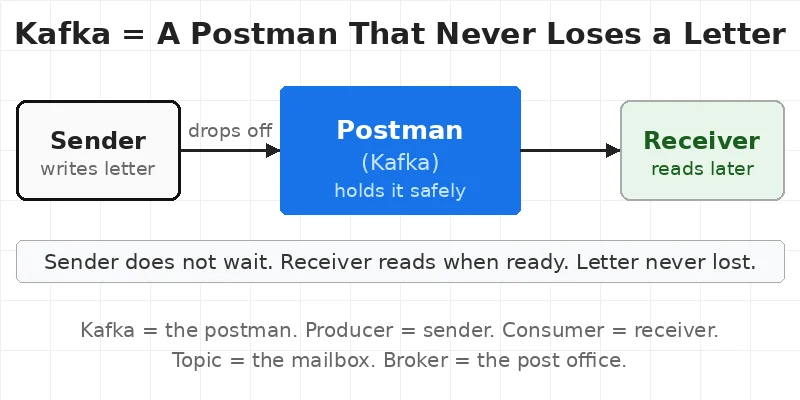
Think of Kafka like a postman.
A letter gets written. It goes to the postman. He keeps it safe. He delivers it when the other person is home. The sender does not wait.
Kafka = a postman that holds messages and delivers them — even when the other side is busy.
Kafka was built at LinkedIn in 2011. Today, more than 80% of Fortune 100 companies use it. Uber, Netflix, Airbnb — all use Kafka.
🧱 4 Key Parts of Kafka
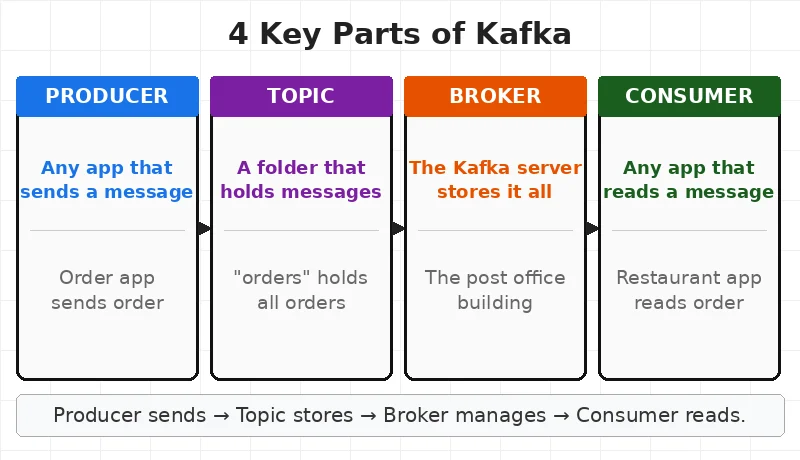
Only 4 things to know.
1. Producer
A producer is any app that sends a message to Kafka. Example: The order app sends order details. That is a producer.
2. Consumer
A consumer is any app that reads a message from Kafka. Example: The restaurant app reads the order. That is a consumer.
3. Topic
A topic is like a folder. Messages go into topics. Producers write to topics. Consumers read from topics. Example: A topic called “orders” holds all order messages.
4. Broker
A broker is the Kafka server. It stores everything. Think of it as the post office building. Topics are the mailboxes inside it.
💾 How Kafka Stores Messages Internally
Most tools delete a message after it is read. Kafka does not.
Kafka writes every message to disk. It keeps it there. The message stays even after the consumer reads it. It stays for days — or weeks — depending on the setting.
This is called a log — a file that only adds new messages at the end. Nothing is deleted. Nothing is changed. Messages just keep getting added.
Think of it like a notebook. Every order gets written down. The notebook never erases anything. Any app can open the notebook and read from any page.
This is why Kafka never loses data. Even if an app crashes and restarts, it can go back and read the messages it missed.

Kafka does not delete messages after reading. It keeps them on disk like a notebook.
⚡ Kafka Partitions — How It Handles Huge Traffic
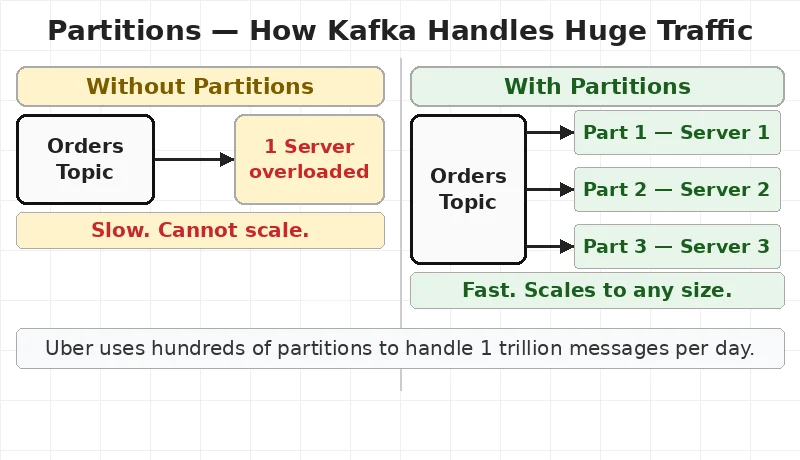
One topic can get millions of messages per second. One server cannot handle that alone.
So Kafka splits a topic into parts. Each part is called a partition.
Think of it like a busy post office. One counter cannot handle 1,000 letters per minute. So the post office opens 10 counters. Each counter handles a share of the letters. Everything moves faster.
Kafka works the same way. One topic gets split into 10 partitions. Each partition sits on a different server. All 10 work at the same time.
This is how Uber handles 1 trillion messages per day. One topic is split into hundreds of partitions. Each partition runs on a separate server. The load gets shared.
Adding more partitions = more speed.
A small app might need 3 partitions. A big app like LinkedIn might use 100 partitions for one topic alone.
🔌 How Producers and Consumers Actually Connect
Producers and consumers never talk to each other directly. They never even know the other exists.
Here is how the connection works:
- Producer connects to the broker. It sends a message to a topic. It does not know who will read it.
- Broker stores the message. It goes into the right partition of the topic.
- Consumer connects to the broker. It asks for new messages from a topic. It does not know who sent them.
- Broker sends the message. Consumer reads it. Done.
The broker is the only one in the middle. Producers and consumers are completely separate.
This is called decoupling — a simple word that means apps do not depend on each other. The order app does not care if the restaurant app is slow. It just sends to Kafka and moves on.
Producers and consumers never talk directly. The broker handles everything in between.
⚙️ How Kafka Works — Step by Step
Here is a real food delivery order, step by step.
- Customer taps ‘Place Order’. The order app sends a message to the “orders” topic in Kafka.
- Kafka stores it. The message sits safely in the broker. Even if every app is busy.
- Restaurant reads it. The restaurant app reads the order from Kafka. It starts making food.
- Driver + Payment read it too. Same message. Both apps read it at the same time. Nothing missed.
Three apps. One message. All at the same time. This is the same idea behind a load balancer — no single point handles everything alone.
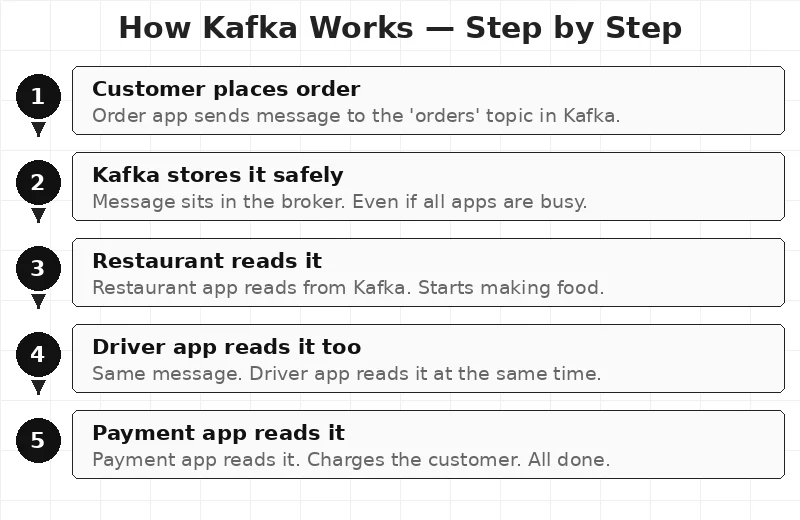
Nothing was lost. Nobody waited.
🌍 Real Companies Using Kafka
LinkedIn built Kafka in 2011. Before that, apps talked directly. The system kept crashing. Messages got lost. Growth stopped.
After adding Kafka, LinkedIn handled 7 million messages per second. No crashes. No lost messages.
Uber
Uber uses Kafka to connect the rider app, driver app, pricing engine, and map system. When a ride is booked, one message goes to Kafka. All four systems read it at once.
Uber processes over 1 trillion Kafka messages per day.
Netflix
Netflix uses Kafka to track every action a user takes — what gets watched, when it gets paused, what gets searched. This data flows into Kafka in real time. The recommendation engine reads it and updates the feed within seconds.
✅ When To Use Kafka — and When Not To
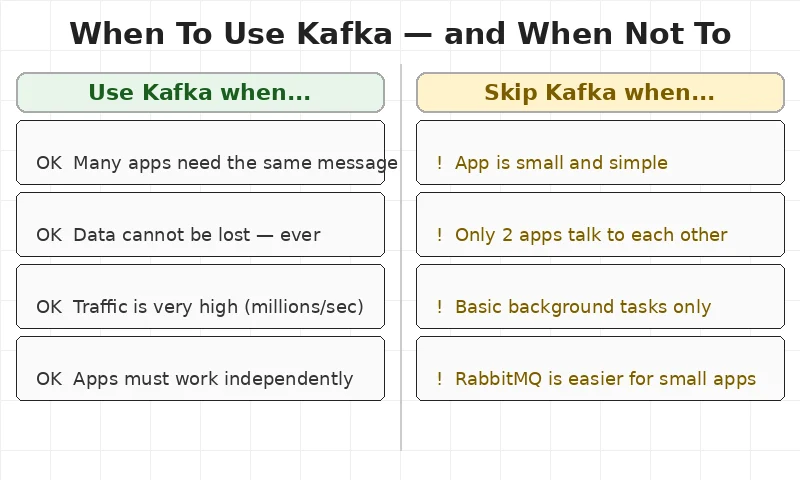
Use Kafka when:
- Many apps need the same message at the same time.
- Data cannot be lost. Kafka keeps messages safe even if apps go down.
- Traffic is very high. Kafka handles millions of messages per second.
- Apps must work on their own. No app should wait for another.
Skip Kafka when:
- The app is small and simple.
- Only two apps talk to each other.
- Background tasks are all that is needed. RabbitMQ is easier for that.
🧠 Key Takeaways
- Kafka is a messaging tool. It sits between apps and passes messages.
- It stores messages on disk. Nothing is lost even if apps go down.
- Partitions make it fast. One topic splits into many parts. Each part runs on a separate server.
- Producers and consumers never talk directly. The broker handles everything.
- 4 key parts: Producer, Consumer, Topic, Broker.
- Used at massive scale. Uber, Netflix, LinkedIn — all use Kafka every day.
📚 Interview Questions
- What is the difference between a Producer, Consumer, and Broker in Kafka?
- Why does Kafka not lose messages even if an app crashes?
- What is a Partition and why does Kafka use it?
- What does “decoupling” mean in the context of Kafka?
- When would you choose RabbitMQ over Kafka?
This article is for educational purposes based on publicly available engineering resources.
