
The Bill Nobody Expected
I remember that day clearly. A teammate opened the cloud bill. Nobody spoke.
Month one — $800. Fine. Normal. Month two — $1,900. Strange. Month three — $2,800. Nobody knew why.
The app was the same. Traffic was the same. But the bill kept going up.
$4,750 wasted. Three months. One bad rule.
The rule was 4 lines long. The fix took 10 minutes.
Cloud billing alerts catch this — but only if the team sets them up first.
For engineers, this means auto-scale needs checking. It is not something to set once and forget.
🗂 What Auto-Scale Is — The Thermostat Analogy
Think of a home thermostat. Room gets cold — it turns on. Room gets warm — it turns off. No one touches it. No waste.
Auto-scale does the same for servers. More people visit the app — it adds servers. People leave — it removes servers. The team pays only for what is on.
Without auto-scale there are two problems. Too few servers — the app slows down. Too many servers — the bill is too high every month.
Auto-scale fixes both. Traffic goes up — servers start. Traffic drops — servers stop.
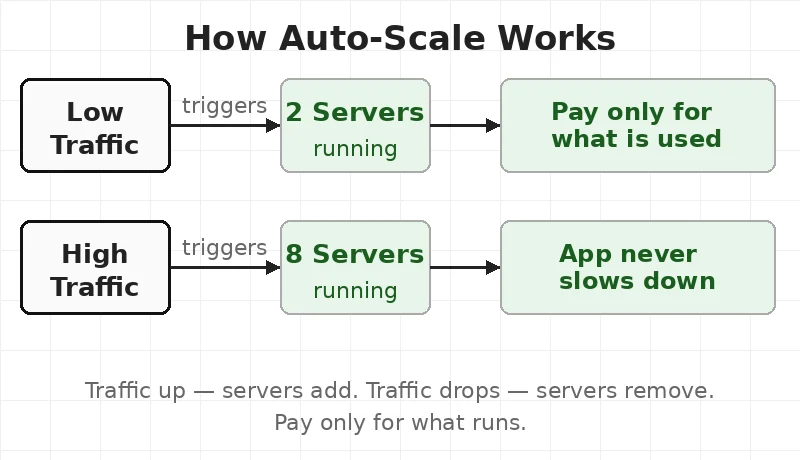
The lesson here is simple — a good rule saves money. A bad rule wastes money every single day. Silently.
🔑 Key Concepts — How Auto-Scale Rules Work
1. The Metric
A metric is a number the cloud watches. The most common one is CPU usage — how busy the server is.
10 people on the site — CPU at 20%. 10,000 people — CPU at 90%.
Other numbers teams watch: memory, number of requests, queue size.
2. The Threshold
A threshold is the number that triggers action.
Example: “CPU above 70% — add 2 servers.” That is scale-up. Example: “CPU below 30% — remove 2 servers.” That is scale-down.
Both are needed. Most teams set scale-up. Many forget scale-down. That is where the money goes.
3. The Cooldown
A cooldown is a wait time between changes.
Without it — the system adds 2 servers, then 2 more, then 2 more. All in one minute.
With a 5-minute cooldown — it adds 2, waits, checks, then decides. Much safer.
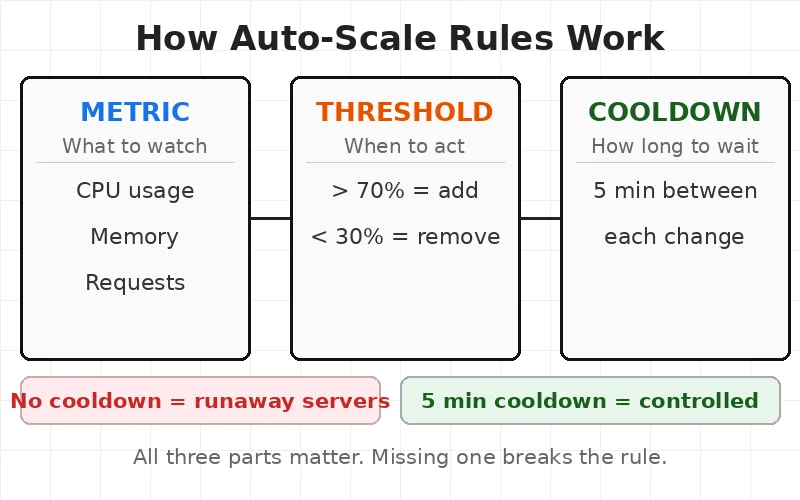
For engineers, this means three parts — not one. Scale-up only is like a car with no brakes.
🧑💻 What Happened — The Mistake in Plain English
The team wrote one rule. CPU above 60% — add 2 servers.
That part worked. Monday morning traffic hit. CPU went to 70%. Two servers added. Good.
Then traffic dropped. But the servers stayed. No rule told them to leave.
Tuesday — another spike. Two more servers added. Now 4 extra servers running at night.
Wednesday. Thursday. Friday. More servers added. None removed.
End of the month — 8 servers running. The app only needed 2.
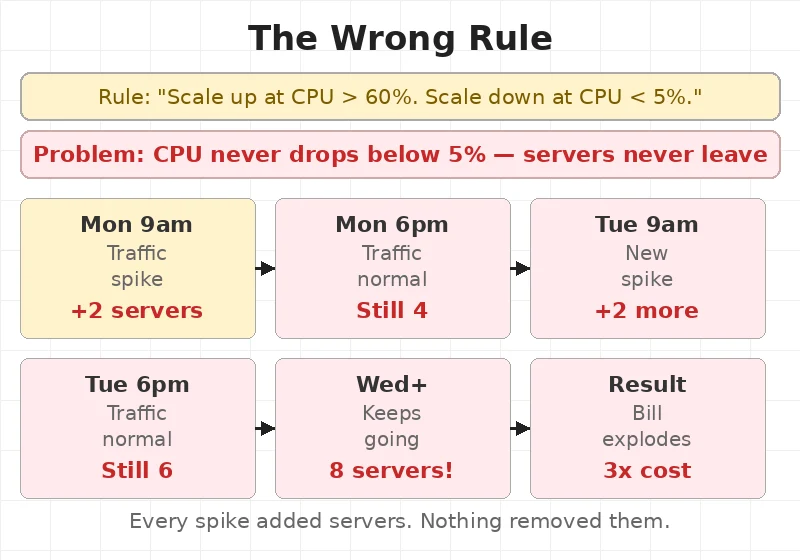
The app felt fine. No errors. No slowdowns. Just a bill getting bigger every week. Nobody noticed until month three.
💸 The Bill Breakdown — Month by Month
Month one — $800. Two servers. Normal.
Month two — $1,900. Servers added up. Never came back down. Five servers running all month.
Month three — $2,800. Eight servers running. App needed two.
Total wasted — $4,750.
Should have paid — $900 per month. Paid 3x that instead.
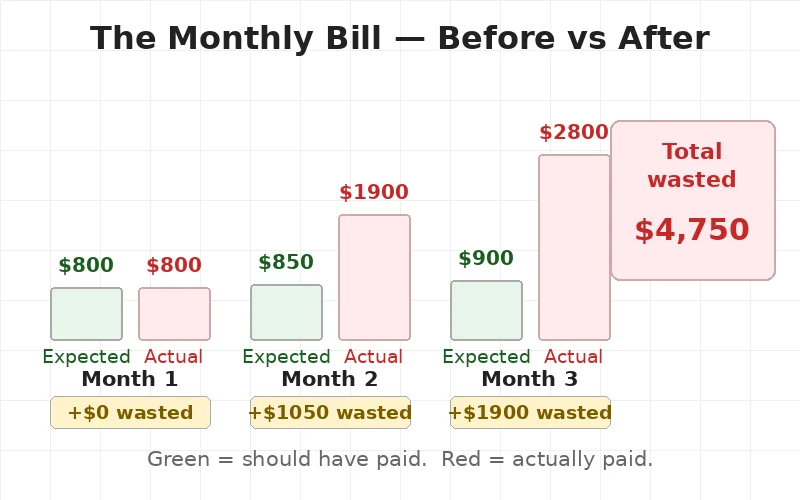
The cloud did nothing wrong. Servers ran. Servers got billed. The rule said keep them on. So they stayed on.
From experience: Cloud bills are the last thing teams check. Set a billing alert before the first deployment. An alert at 80% of the expected budget costs nothing. It saves everything.
🔧 The Fix — 5 Lines That Changed Everything
The team sat down and rewrote the rule. Took one hour.
Before — broken:
- Scale up: CPU > 60% → add 2 servers
- Scale down: CPU < 5% → remove servers
- Cooldown: none
- Minimum servers: not set
- Maximum servers: not set
The scale-down number was 5%. That is almost impossible. A server doing nothing still uses some CPU. It rarely drops below 5%.
After — fixed:
- Scale up: CPU > 70% → add 2 servers
- Scale down: CPU < 30% for 10 minutes → remove 2 servers
- Cooldown: 5 minutes between each change
- Minimum servers: 2 always on
- Maximum servers: 10 hard limit
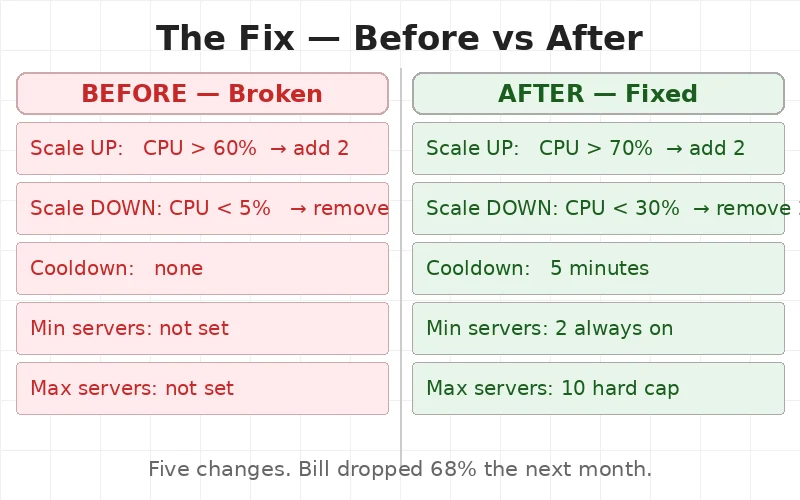
Scale-down moved from 5% to 30%. Now servers could actually leave. The cooldown stopped the system from panicking. The minimum kept 2 servers always ready. The maximum stopped the bill from running wild.
Just like a load balancer needs the right rules to work, auto-scale needs the right numbers. The tool only does what it is told.
📉 What Happened After the Fix
Month four — $950. Two servers most of the time. Spikes came. Servers added. Then removed. Clean.
Month five — $880. Steady. Close to what was planned.
The app did not change. Users felt nothing different. The team just stopped paying for servers doing nothing.
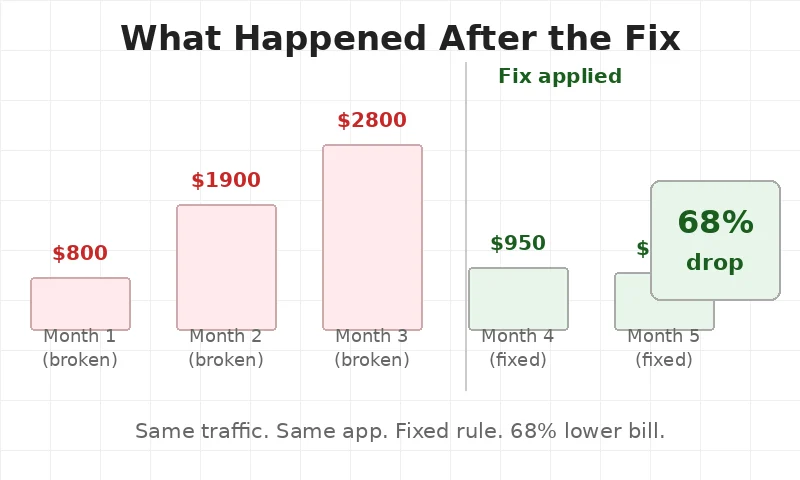
Any team running cloud servers needs to know this — cloud platforms protect performance by default. Not cost. Scale-down rules must be set by the team. The cloud will not do it alone.
✅ When To Use — Auto-Scale Checklist
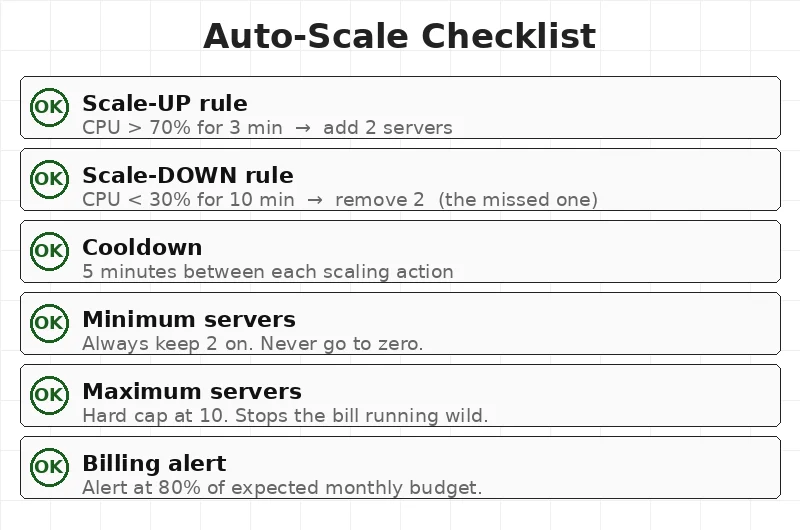
Set these before going live:
- Scale-up rule — when to add servers (CPU > 70% for 3 min)
- Scale-down rule — when to remove servers (CPU < 30% for 10 min)
- Cooldown — how long to wait between changes (5 minutes)
- Minimum servers — never go to zero (keep 2 always on)
- Maximum servers — a hard limit to protect the budget (e.g. 10)
- Billing alert — get a warning at 80% of expected monthly spend
Skip auto-scale when:
- Traffic never changes — same load every hour
- The app is still in early testing — use fixed servers first
Engineers learning cloud — the DevOps engineer roadmap covers auto-scale alongside CI/CD and containers.
✅ Key Takeaways
- Auto-scale adds and removes servers on its own. It watches CPU and acts when the number crosses a limit.
- Scale-down rules matter as much as scale-up. Forgetting scale-down is the most expensive mistake.
- Always set a cooldown. Without it the system keeps adding servers without checking first.
- Set a minimum and maximum. Minimum stops cold starts. Maximum stops big bills.
- Set a billing alert before going live. Not after the first surprise.
- The fix is small. One wrong number caused $4,750 in waste. Five changes fixed it for good.
🎯 Interview Questions
- A team’s cloud bill tripled in one month but traffic only grew by 20%. What is the first thing to check?
- What is the difference between a scale-up threshold and a scale-down threshold — and why do both matter?
- Why is a cooldown period important in auto-scale rules? What happens without one?
- A team sets the minimum server count to 0 to save money at night. What problem could this cause?
- What metric other than CPU would make sense to use for auto-scaling a web app — and why?
This article is for educational purposes based on publicly available engineering resources.