Docker Was Great. Until It Wasn’t.
We had Docker. Everything was running in containers. Life was good.
Then the product grew.
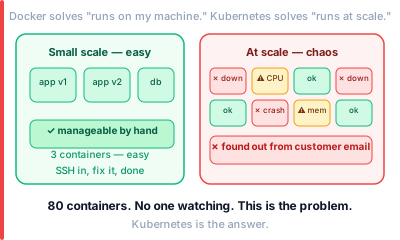
We had 12 containers running. Then 40. Then 80.
One container crashed at 2am. Nobody knew. Users were getting errors. We found out from a customer email the next morning.
Another container was using all the CPU on the server. Starving everything else. Again — nobody knew until it was too late.
We were manually SSHing into servers. Restarting containers by hand. It was chaos.
Our team lead said — “We need Kubernetes.”
I had heard the word. I had no idea what it meant.
This is what I wish someone had explained to me that day.
What Kubernetes Actually Is
Kubernetes is a manager.
Not the micromanaging kind. The good kind. The kind that watches everything, fixes problems before you even notice them, and makes sure the right number of people are always working.
You tell Kubernetes what you want. “I want 5 copies of this app running at all times.” Kubernetes makes it happen. If one crashes — Kubernetes starts a new one. Automatically. You do not have to do anything.
If traffic spikes — Kubernetes adds more containers. Traffic drops — it removes them. You are not paying for idle servers at 3am.
That is the whole idea.
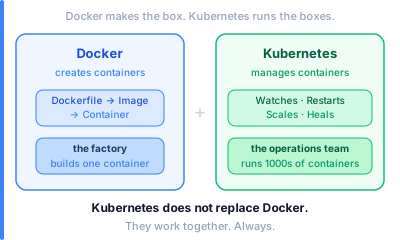
Kubernetes does not replace Docker. Docker creates the containers. Kubernetes manages them.
The Three Things Kubernetes Does
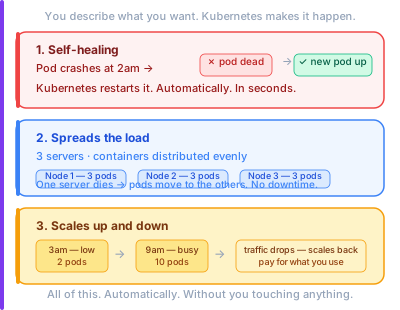
1. Keeps Things Running
You say “I want 3 copies of my app.” Kubernetes runs 3. One dies — Kubernetes starts a replacement in seconds. You never have to SSH in and restart anything manually again.
This is called self-healing. The system fixes itself.
2. Spreads the Load
You have 3 servers. Kubernetes spreads your containers across all 3. If one server goes down — the containers move to the other servers automatically.
No single point of failure. No manual work.
3. Scales Up and Down
Traffic is low at 3am. Kubernetes runs fewer containers. Traffic spikes at 9am when everyone logs in. Kubernetes adds more.
You pay for what you use. Not for idle machines sitting there doing nothing.
The Parts — Explained Simply
Kubernetes has a few moving parts. Each one has a job.
The Cluster
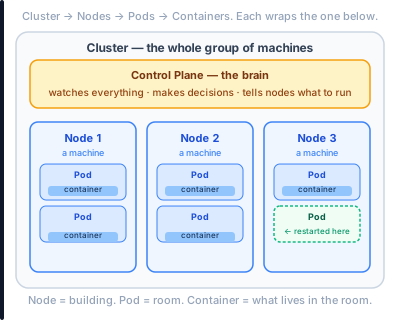
Everything in Kubernetes lives in a cluster. A cluster is just a group of machines working together. You treat them as one big computer. Kubernetes handles the rest.
The Node
A node is one machine inside the cluster. Could be a physical server. Could be a virtual machine. Your containers run on nodes.
The Pod
A pod is the smallest unit in Kubernetes. It is basically a wrapper around one container. One app, one pod. Most of the time.
Think of it this way — a node is a building. A pod is a room. Your container is what lives in the room.
The Control Plane
This is the brain. It watches everything. Makes decisions. Tells nodes what to run. If you have ever had a good manager who handled problems before you knew they existed — that is the control plane.
How It Actually Works
Here is what happens when you deploy something to Kubernetes.
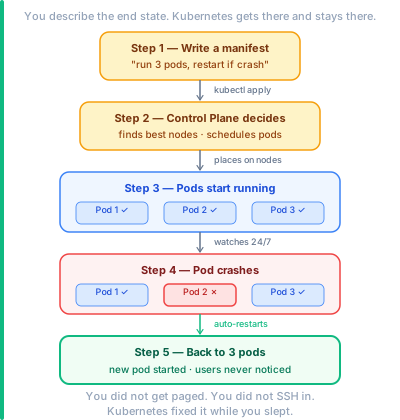
Step 1 — You describe what you want. You write a file. It says — “Run 3 copies of this Docker image. Give each one 512MB of memory. Restart if it crashes.”
This file is called a manifest. You do not tell Kubernetes how to do it. Just what you want.
Step 2 — Kubernetes figures out where. The control plane looks at all the nodes. Checks which ones have space. Picks the best ones. Places the pods there.
Step 3 — Your pods start running. The nodes pull the Docker image. Start the containers. Your app is live.
Step 4 — Kubernetes watches. It keeps checking. Is everything still running? Did anything crash? Is traffic going up? It never stops watching.
Step 5 — Something goes wrong. A pod crashes. Kubernetes notices in seconds. Starts a replacement on another node. Traffic is rerouted. Most users never notice.
From experience: The hardest part of Kubernetes is not using it. It is writing good manifests. A bad manifest can tell Kubernetes to give each container 8GB of RAM when your app needs 200MB. Suddenly your servers are starved and nothing can schedule. Always start with small resource limits and adjust from real usage data.
Real Teams Using This
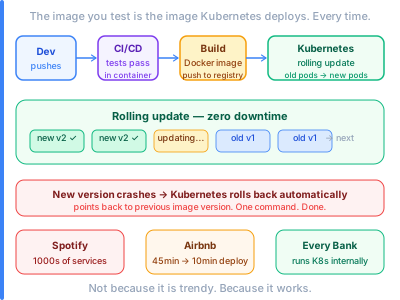
Spotify runs thousands of microservices. Each service is a set of pods. Teams deploy independently. One team’s bad deploy does not touch another team’s pods. Kubernetes keeps them isolated.
Airbnb moved from manually managed servers to Kubernetes. Deploy time went from 45 minutes to under 10. Rollbacks that used to take an hour now take seconds. They just point Kubernetes back at the previous image version.
Every major bank now runs Kubernetes internally. Not because it is trendy. Because running 200 services on manually managed servers is a nightmare. Kubernetes makes it manageable.
This is why Docker and Kubernetes go together. Docker packages the app. Kubernetes runs it at scale. One without the other is half the solution.
And your CI/CD pipeline is what connects them. Build the Docker image. Push it. Tell Kubernetes to use the new version. Automated. No human in the loop.
But Is It Complicated?
Yes. Honestly.
Kubernetes has a steep learning curve. YAML files everywhere. Lots of new words. A whole ecosystem of tools around it.
But you do not need to know all of it to start.
Start with this mental model:
- Docker makes the container
- Kubernetes runs the containers
- You tell Kubernetes what you want
- Kubernetes makes it happen and keeps it that way
That is 80% of what you need to understand.
The rest — networking, storage, ingress, RBAC — you learn as you need it. Not all at once.
Before You Go
I used to SSH into servers at 2am to restart crashed containers.
I do not do that anymore.
Kubernetes watches the containers so I do not have to. A pod crashes — Kubernetes restarts it before my phone buzzes. Traffic spikes — Kubernetes adds pods before users notice slowdowns.
It felt overwhelming at first. Now it feels like the floor I build on. Solid. Reliable. Always there.
Start with one service. One deployment. Get comfortable. Then grow.
Numbers and examples in this post are based on public data as of 2025.